
iHam ("interactive HOG Analysis Method") is an interactive viewer for the evolutionary history of a gene family organised as hierarchical orthologous groups (HOGs). It has two panels: a species tree, in which you pick the taxonomic range to focus on, and a matrix that places the extant genes by species (rows) and by HOG at the selected level (columns).
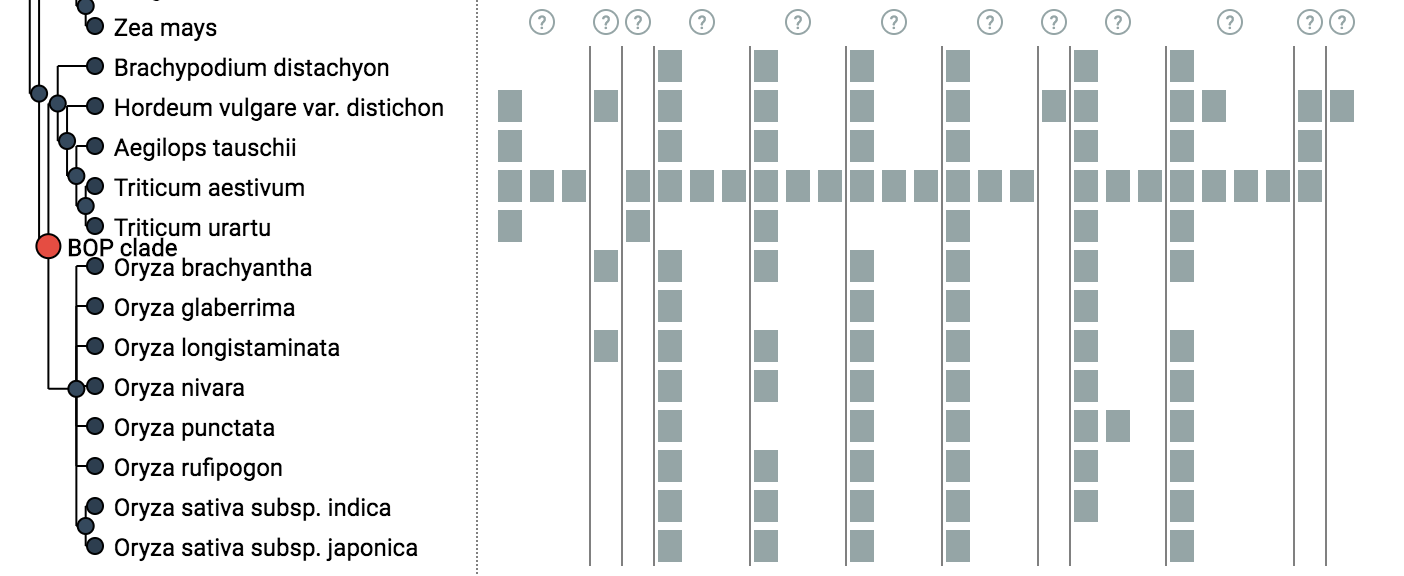
The tree-guided matrix helps to (i) delineate orthologous groups at a given taxonomic range, (ii) identify duplication and loss events along the species tree, (iii) gauge the cumulative effect of duplications and losses on gene repertoires, and (iv) spot potential problems in genome assembly, annotation or orthology inference (e.g. losses concentrated on terminal branches, or implausible species coverage). Genes can be coloured by protein length, GC content, number of exons or function similarity; low-coverage HOGs can be hidden; clades can be collapsed. iHam is used to display HOGs in the OMA browser.
Input: HOGs in OrthoXML (plain, or OMA's augmented flavour), the species tree in newick or phyloXML, and optionally gene family data in JSON.
Version 2 is a rewrite as a Vue 3 component and
<i-ham>web component. iHam 1.x (TnT/d3 v3 based,iHam()chainable API) is on thev1branch and released asv1.x; this branch keeps its last bundles inbuild/for older pyham versions only.
Clément-Marie Train, Miguel Pignatelli, Adrian Altenhoff, Christophe Dessimoz; iHam and pyHam: visualizing and processing hierarchical orthologous groups, Bioinformatics, bty994, https://doi.org/10.1093/bioinformatics/bty994
npm install iham@nextWhile iHam 2 is in pre-release, its versions are published under the npm dist-tag next; npm install iham still installs iHam 1.
<script setup>
import { ref } from "vue";
import { IHam } from "iham";
import "iham/style.css";

const level = ref("Homininae");
</script>

<template>
  <IHam
    orthoxml-url="/oma/hog/HOG:F0782425.2c.7a/orthoxml/augmented/"
    species-tree-url="/All/speciestree.nwk"
    gene-data-url="/oma/hogdata/HUMAN31534/json"
    query-hog="HOG:F0782425.2c.7a_207598"
    preset="oma"
    v-model:level="level"
    @hogs-hidden="({ level, hogs }) => console.log(level, hogs)"
  />
</template><script type="module" src="https://cdn.jsdelivr.net/npm/iham@next/dist/element/iham-element.js"></script>
<!-- or, as a classic script: .../dist/element/iham-element.iife.js;
pin an exact version (e.g. iham@2.0.0-alpha.7) in production, and use iham@2 once 2.0.0 is out -->
<i-ham
orthoxml-url="https://omabrowser.org/oma/hog/HOG:F0782425.2c.7a/orthoxml/augmented/"
species-tree-url="https://omabrowser.org/All/speciestree.nwk"
level="Homininae"
preset="oma"
base-url="https://omabrowser.org"
></i-ham>
<script>
const viewer = document.querySelector("i-ham");
viewer.addEventListener("node-selected", (e) => console.log(e.detail.name));
// objects and functions are set as properties:
// viewer.geneData = [...]; viewer.geneColors = (gene, id) => "#c00";
</script>The element bundles Vue and renders into a shadow root, so page styles don't leak in or out.
Attributes are the kebab-case form of the property names.
| Property | Type | Default | Description |
|---|---|---|---|
orthoxml / orthoxmlUrl |
string | OrthoXML content, or a URL to load it from | |
speciesTree / speciesTreeUrl |
string | species tree (newick or phyloXML), or a URL | |
geneData / geneDataUrl |
array / string | gene family data ([{id, protid, xrefid, sequence_length, gc_content, nr_exons, similarity}]) |
|
augmented |
boolean | auto | parse as OMA augmented OrthoXML (detected automatically) |
queryHog |
string | HOG id whose members are highlighted (OMA: <hog id>_<taxid>) |
|
queryGene |
number | gene id to highlight | |
level |
string | root | taxonomic level to open at (v-model:level) |
coverageThreshold |
number | 0 |
hide HOGs present in fewer than this % of species (v-model) |
colorScheme |
query | sequence_length | gc_content | nr_exons | similarity |
query |
gene colouring (v-model) |
geneColors |
(gene, id) => color |
custom colouring, overrides colorScheme |
|
tooltipTrigger |
click | hover |
click |
how gene info is opened |
toolbar |
open | collapsed | hidden |
open |
built-in toolbar; collapsed puts the settings behind a Settings button (the colour legend and the hidden-HOG notice stay visible) |
preset |
oma | none |
none |
oma enables OMA browser links and API lookups (GO terms, HOG ids) |
baseUrl |
string | "" |
base URL for the oma preset (relative by default) |
links, api |
object | override individual link/API URL templates, e.g. { hogViewer: "/hog/{hogId}/{level}" }; placeholders {hogId}, {level}, {protId}, {xref}, {geneId} |
|
treeWidth |
number | 330 |
width of the tree panel (px) |
rowHeight |
number | 20 |
height of a species row (px) |
maxHeight |
string | 80vh |
maximum height of the scrollable viewer (CSS length) |
showInternalLabels |
boolean | true |
label the selected internal node |
| Event | Payload | |
|---|---|---|
loaded |
{species, genes, augmented} |
data parsed |
node-selected |
{name, isLeaf, species} |
a tree node was selected (hover or programmatically) |
update:level |
level name | for v-model:level |
hogs-hidden |
{level, hogs: [{index, hogId?}]} |
the HOGs hidden by the coverage threshold changed (hogId with augmented OrthoXML) |
update:coverageThreshold, update:colorScheme, update:tooltipTrigger |
value | for v-model |
error |
Error |
loading or parsing failed |
On the custom element these are DOM CustomEvents whose detail is the payload (e.detail.name for node-selected; in 2.0.0-alpha.6 and earlier it was e.detail[0]). The camelCase events are also dispatched in kebab-case (update:coverage-threshold). They don't bubble: listen on the element itself.
The component (through a template ref) and the element have:
| Method | |
|---|---|
setLevel(level) |
open at a taxonomic level and scroll it into view; false if the level is not in the tree, or the data is not loaded yet (set level for the initial level) |
freeze(level?) |
freeze at a level, or at the selected one: hovering the tree no longer changes the level |
unfreeze() |
On the element, level, coverageThreshold, colorScheme and tooltipTrigger (and their attributes) follow the viewer, like v-model: they always hold the current value, and setting them always takes effect. The types IHamProps, IHamEvents and IHamMethods are exported; iham/element also types <i-ham> (document.querySelector("i-ham"), addEventListener).
For use without the UI, iham also exports parseSpeciesTree, parseOrthoXml and computeLevelView (the HOG columns and gene positions at a level, after the coverage filter), and omaEndpoints / fillTemplate for the link templates.
Colours and the font are CSS custom properties. Set them on the viewer (<IHam>'s root element .iham, or the <i-ham> element; custom properties also reach into its shadow root) or on any ancestor:
| Property | Default | |
|---|---|---|
--iham-font |
system-ui, …, sans-serif |
font of the whole viewer |
--iham-fg, --iham-bg |
#222, #fff |
text and background |
--iham-muted |
#7f8c8d |
secondary text, HOG markers, toolbar borders |
--iham-border |
#ddd |
grid lines and popover border |
--iham-link |
#2a6ebb |
links in popovers |
--iham-selected |
#e74c3c |
selected tree node |
--iham-accent |
#2c3e50 |
the HOG marker under the pointer or whose details are open |
--iham-tree-branch, --iham-tree-node, --iham-tree-leaf |
#222, #34495e, #2c3e50 |
species tree |
--iham-popover-title-bg, --iham-popover-title-fg |
#2c3e50, #fff |
popover title bar |
--iham-notice-bg, --iham-notice-fg |
#d6eaf8, #1b4f72 |
"N HOGs hidden" notice |
Gene colours come from colorScheme or geneColors.
npm install
npm run dev        # playground at http://localhost:5173 (proxies /oma, /api, /All to omabrowser.org; IHAM_OMA_URL to change, e.g. to OMA stage)
npm test           # unit, component and v1-parity tests (vitest + jsdom)
npm run test:e2e   # browser tests (Playwright: Chromium, Firefox, WebKit) against the built demo;
                   # once: npx playwright install chromium firefox webkit
npm run typecheck
npm run build      # dist/iham.js + iham.css (Vue library), dist/element/* (web component), dist/types