
Send every Strapi email through the right account: several SMTP and API accounts, routing rules, quotas, failover that never doubles a mail, an outbox with retries, templates and delivery tracking, all inside the Strapi admin.





Live docs: https://schero94.github.io/Magic-Mail/
Your code keeps calling strapi.plugin('email').service('email').send(). Strapi's password-reset mail and every Users & Permissions mail go through MagicMail without changes. MagicMail picks the account, reserves its quota, logs the mail and tells you what happened to it.
MagicMail sends email only. It is MIT licensed, with no license key, tiers or usage limits.
- Six providers. Gmail, Microsoft 365 and Yahoo with OAuth 2.0, any SMTP server (optional DKIM), SendGrid and Mailgun. Credentials are encrypted with AES-256-GCM and never reach the browser.
- Routing rules. Choose the account by email type, recipient, subject, template or a custom value, with a fallback account per rule.
- Quotas and safe failover. Hourly and daily limits per account, reserved atomically. When an account fails, the next one is tried only if the error proves the provider did not take the mail, so a mail is never delivered twice by failover.
- Outbox with retries. Opt-in per send or for every failed send: 3 retries by default (after 1, 5 and 15 minutes, configurable from 1 to 10), idempotency keys, and an Outbox tab where you retry, discard or mark uncertain mails as sent.
- Delivery webhooks. Signed SendGrid and Mailgun bounce and complaint webhooks update the delivery log and emit events other plugins can listen to.
- Templates. A visual editor (Unlayer) or plain HTML and text, Mustache variables, versions with restore, import and export, plus the Users & Permissions reset and confirmation mails.
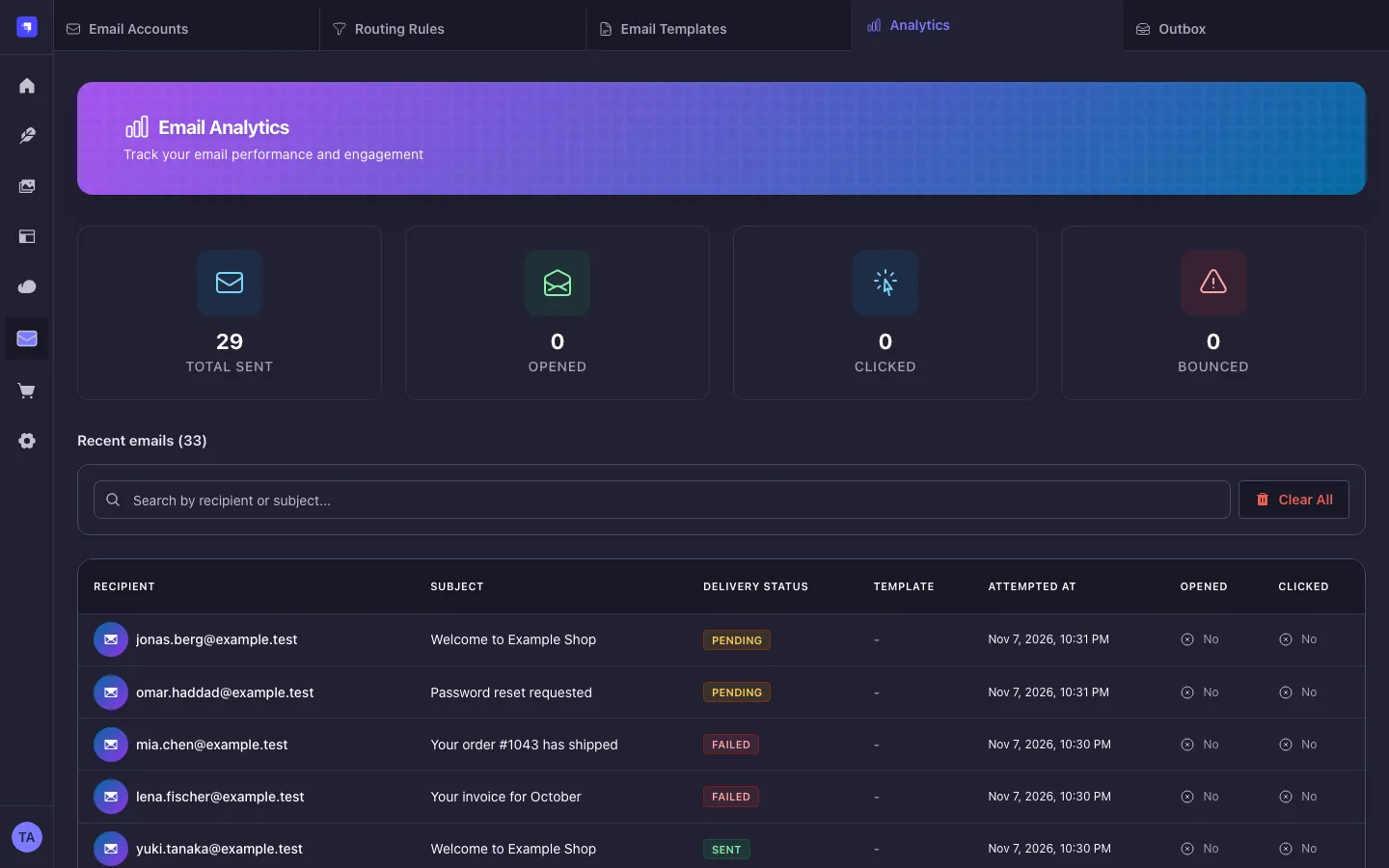
- Analytics. A delivery log with server-side search, open and click tracking with truncated IPs and configurable retention.
- Several instances. Railway replicas or pm2 workers on one database work without sticky sessions or Redis.
- Admin in five languages. English, German, French, Spanish and Portuguese, in light and dark mode.
- Quick start
- Compatibility
- Screenshots
- Sending email
- Provider setup
- Routing rules and quotas
- Templates and the visual editor
- Tracking, privacy and retention
- Bounces and complaints
- Content API
- Admin API
- Permissions
- Configuration reference
- Retries and the outbox
- Running several instances (Railway replicas, pm2 cluster)
- Security and privacy
- Troubleshooting
- FAQ
- Migration notes
- Contributing
About a minute in an existing Strapi 5 project:
npm install strapi-plugin-magic-mail
# yarn add strapi-plugin-magic-mail  |  pnpm add strapi-plugin-magic-mail
// config/plugins.js (config/plugins.ts: export default () => ({ ... }))
module.exports = () => ({
'magic-mail': { enabled: true },
});# Outside development and test MagicMail needs an encryption key. Generate it once and keep it.
node -e "console.log(require('crypto').randomBytes(32).toString('hex'))"
# .env
MAGIC_MAIL_ENCRYPTION_KEY=<the generated value>npm run build
npm run developOpen MagicMail → Email Accounts, click Add account, pick a provider (see Provider setup) and use the account's Test action with your own address. From now on every strapi.plugin('email') call goes through MagicMail.
Keep the encryption key stable: without it the stored account credentials cannot be read. Super admins see MagicMail right away; other roles need the permissions access and read.
| MagicMail | Strapi | Node.js | Databases |
|---|---|---|---|
| 4.x | ^5.57.0 (acceptance host: Strapi 5.61.0) |
>=22.12.0 <=26.x.x (CI runs Node 22 and 24) |
PostgreSQL, MySQL 8, SQLite. Several processes: PostgreSQL tested, MySQL not load-tested |
| 3.1 | ^5.57.0 |
>=20.19.0 <=26.x.x |
as Strapi |
- Peer dependencies:
@strapi/strapi,@strapi/plugin-users-permissions(every default Strapi app has it; the email log links to its users),react,react-dom,react-router-domandstyled-componentsas in acreate-strapi-appproject.@strapi/design-system,@strapi/iconsandreact-intlare optional peers, which the Strapi admin provides. - The packed plugin installs without plugin warnings into a fresh
create-strapi-app@5.61project with yarn 1, npm 11 and pnpm. - The minimum Strapi version is 5.57.0, the first release whose admin ships Design System 2.2.4, the version the MagicMail admin uses.
All screenshots show synthetic data (example.test addresses) on an isolated Strapi 5.61 host.
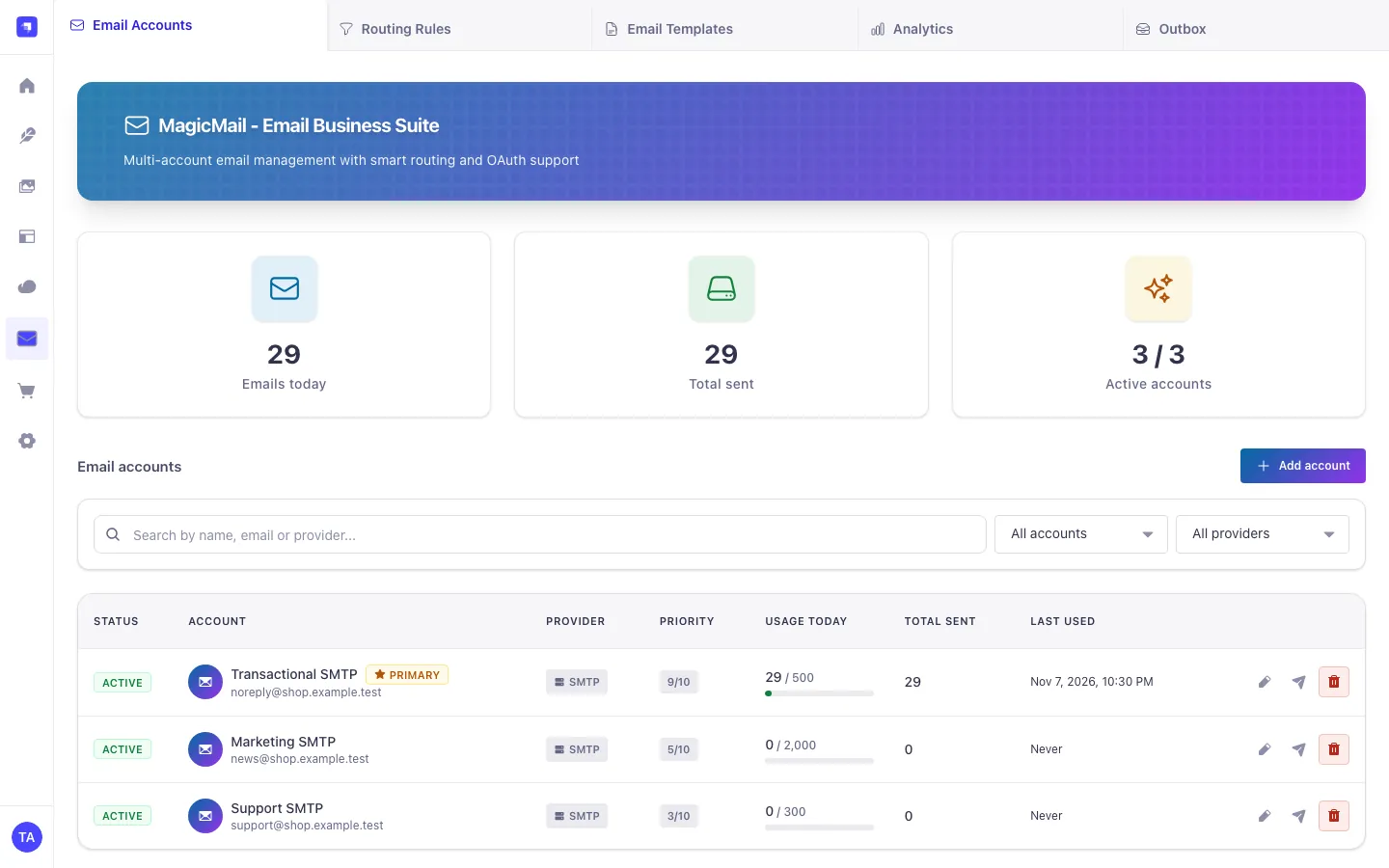
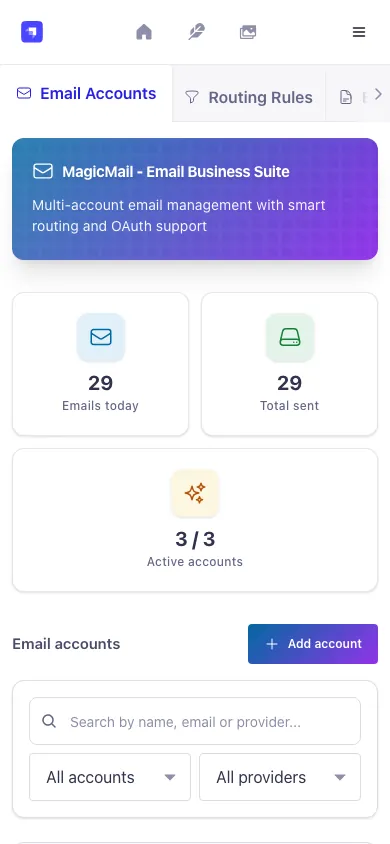
Accounts with status, provider, priority, today's usage against the daily limit, total sent and last use, plus edit, test and delete. Below 768 px each row becomes a card.
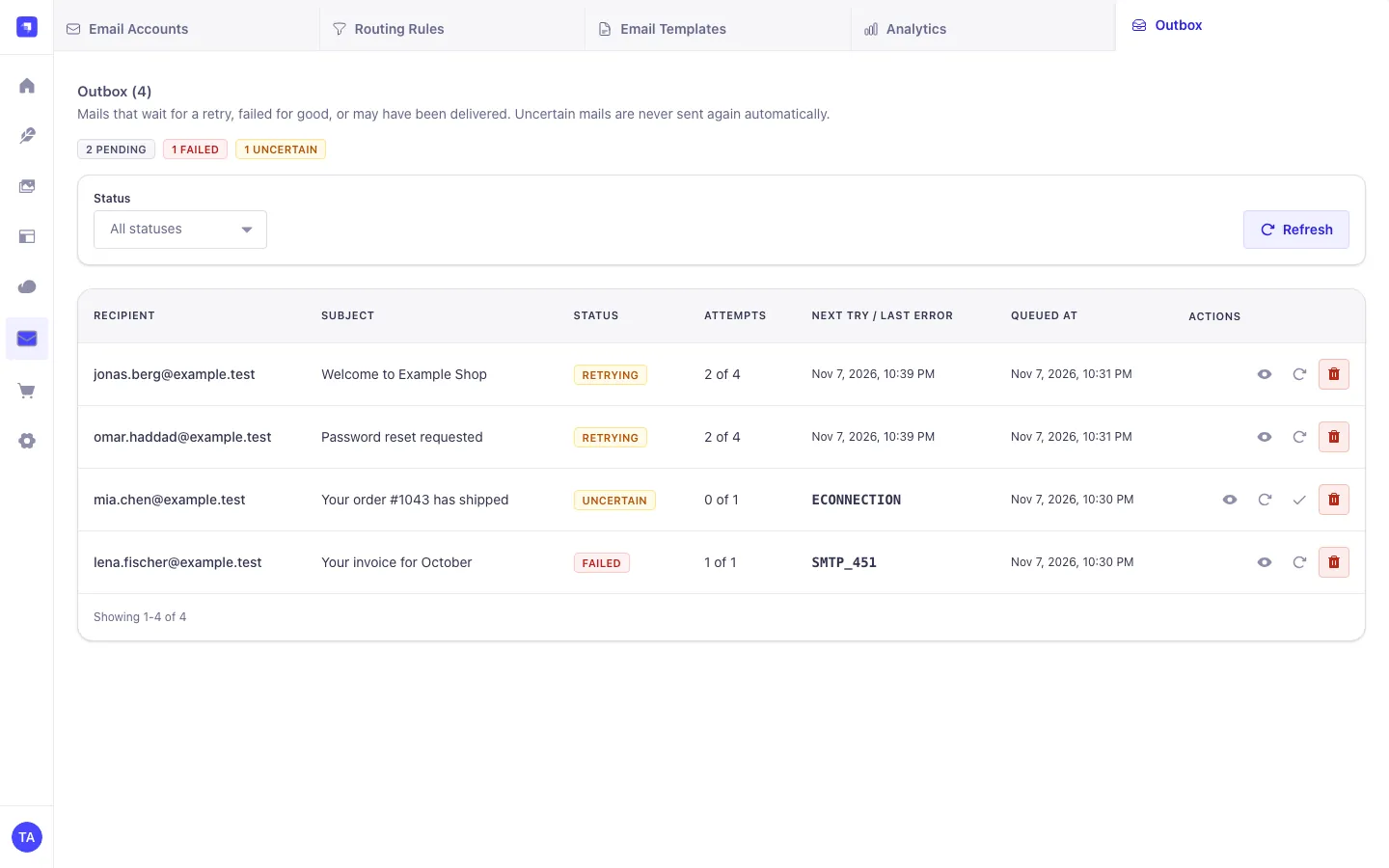 Mails waiting for a retry, failed for good, or uncertain, with attempts, next try or last error code. Retry now, Mark as sent and Discard per row.
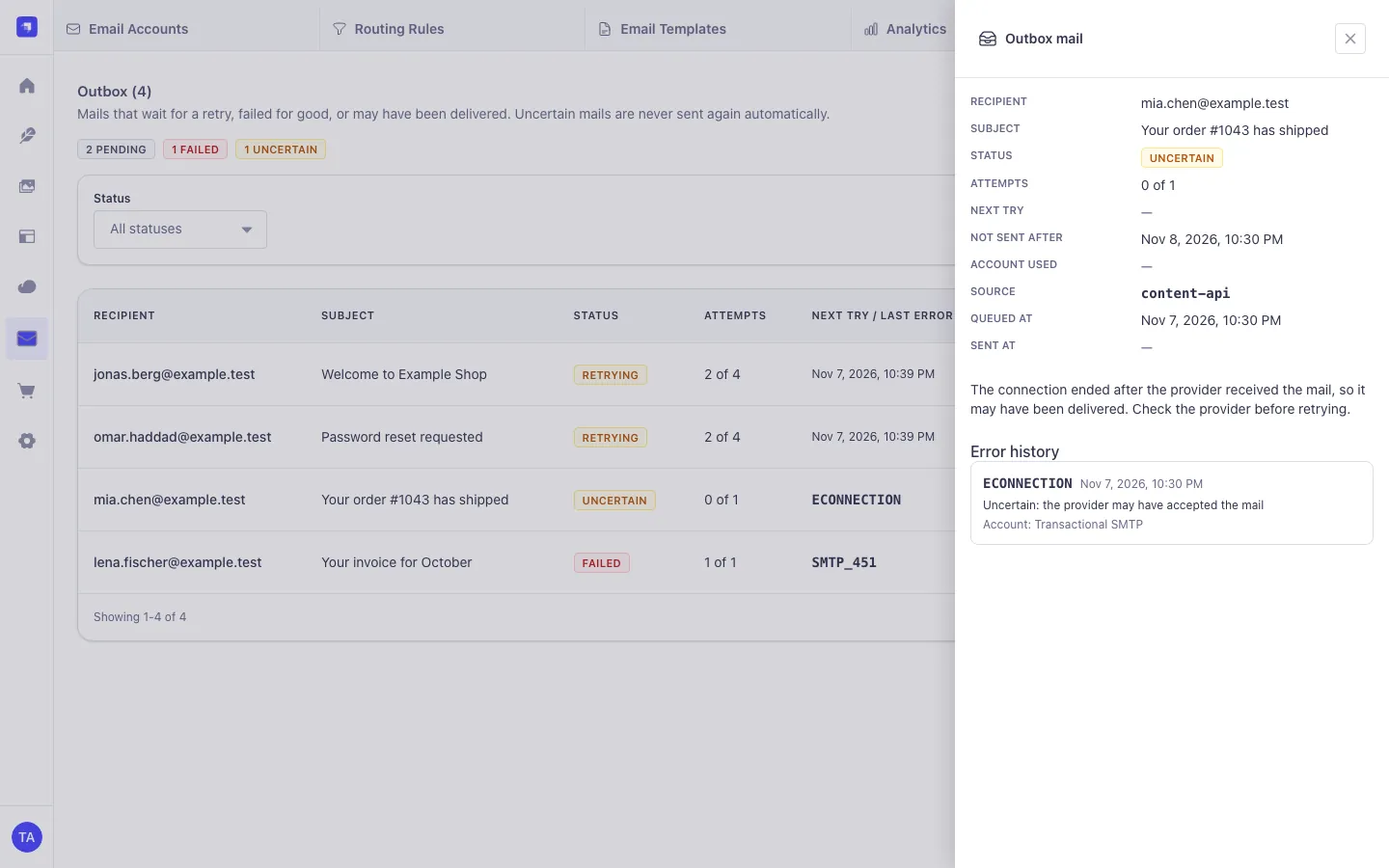 Details of an uncertain mail. The error history stores codes and account names only, never the provider's message or the mail content.
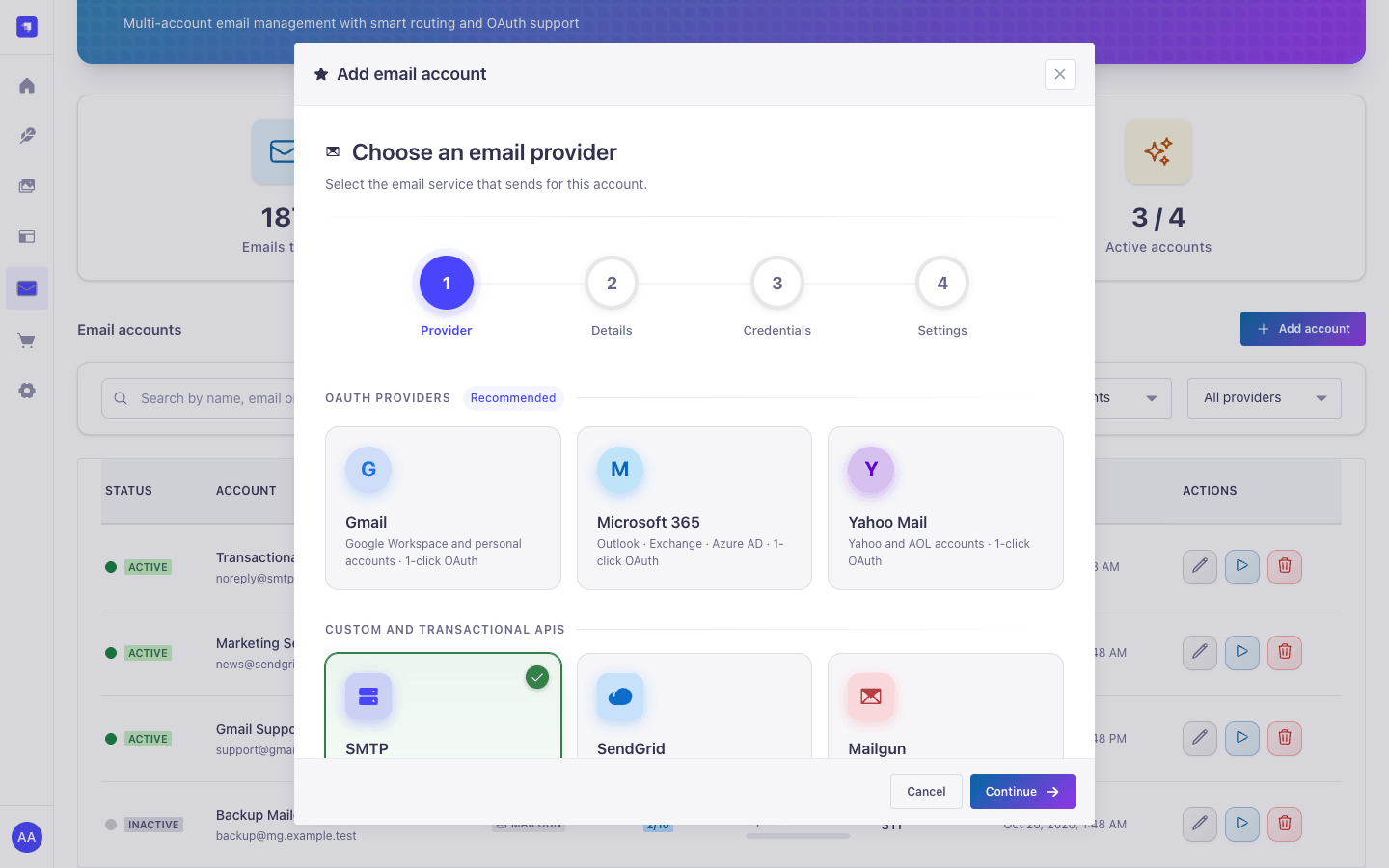 Four steps: provider, details, credentials, settings. OAuth providers connect in a popup.
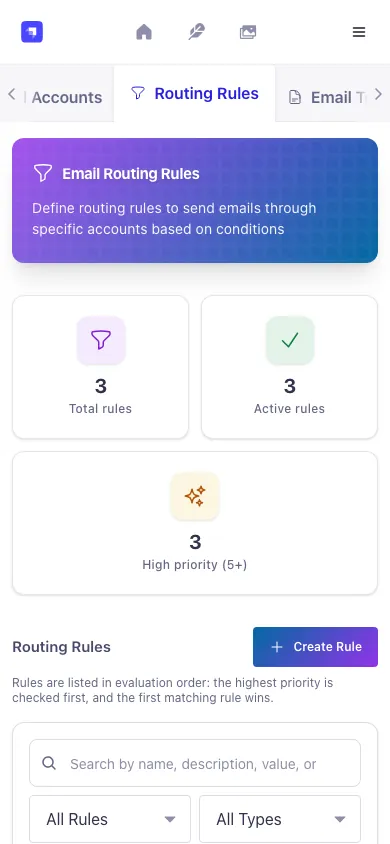
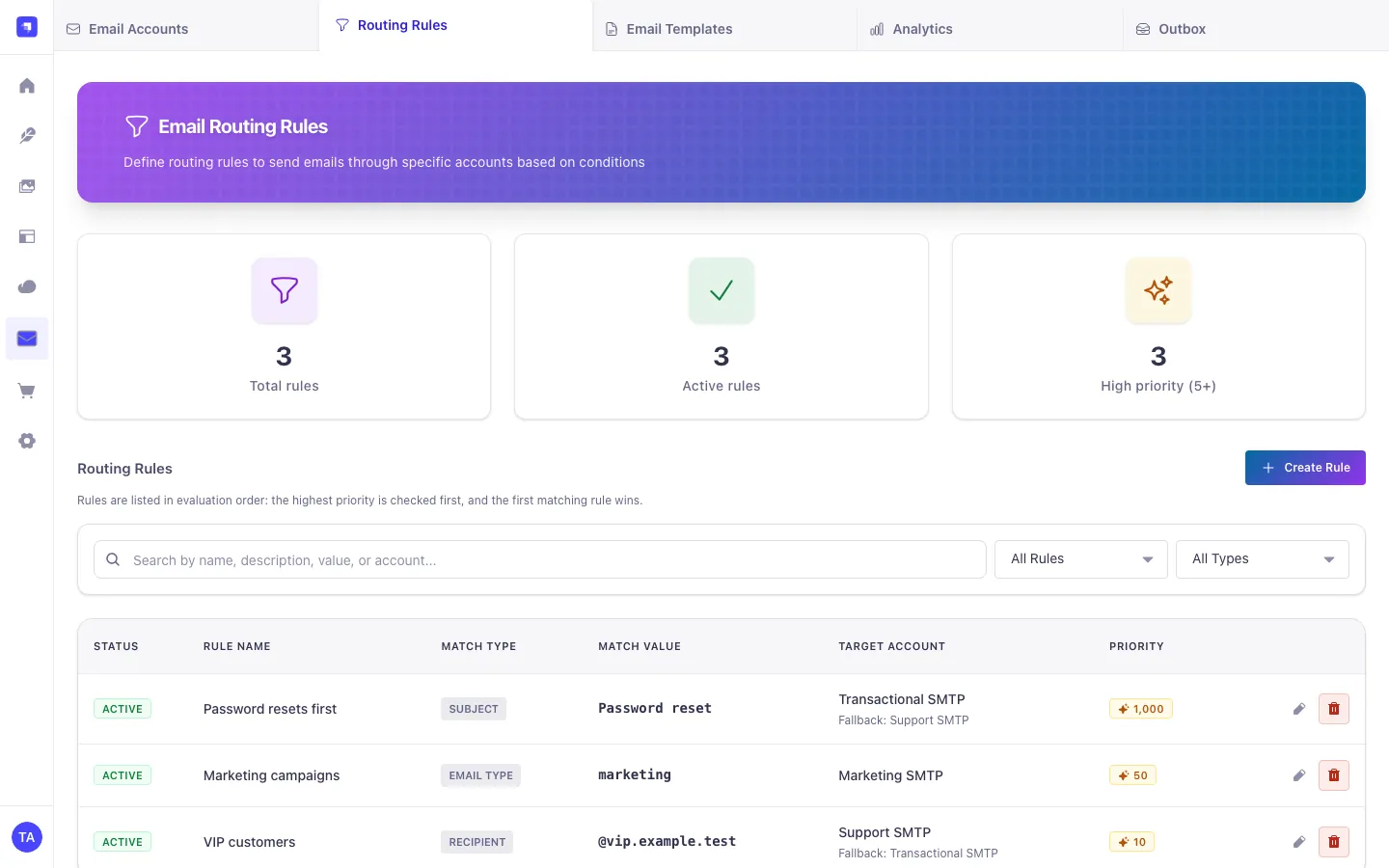 Rules in evaluation order. Rules that point to a missing or inactive account are flagged.
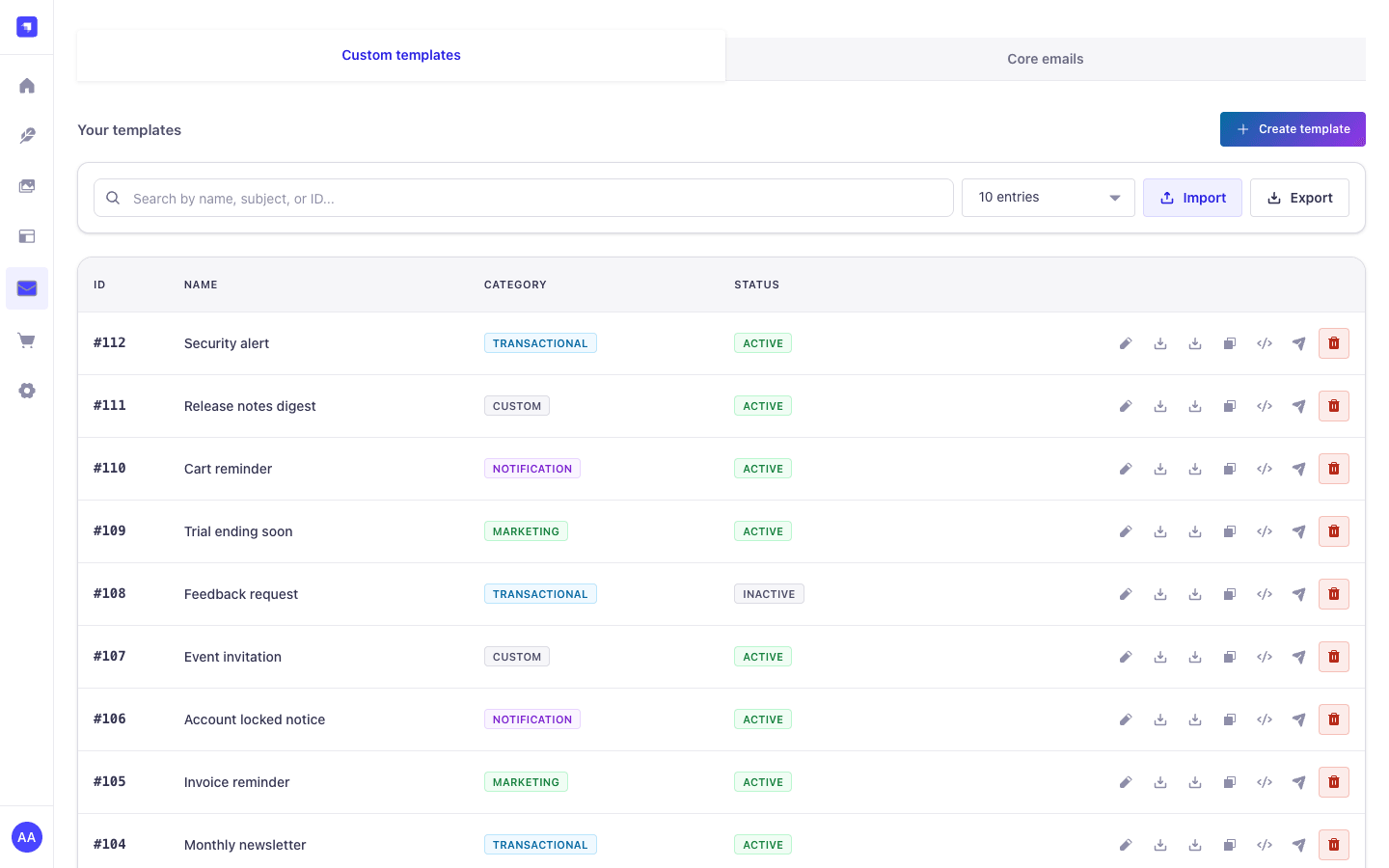 Templates with Reference ID, category and status; edit, download as HTML or JSON, duplicate, code snippets, test send and delete.
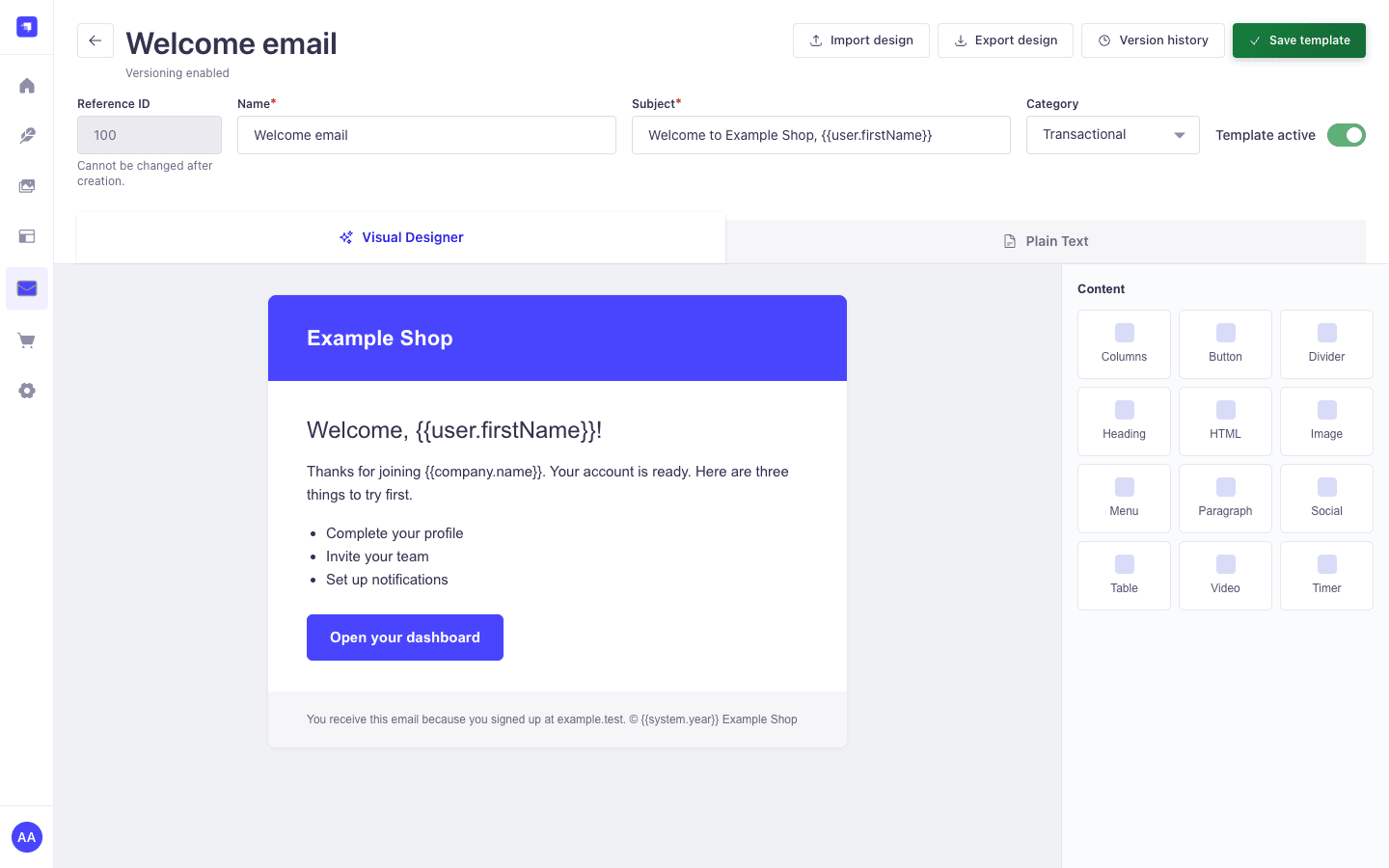 Template editor. For this screenshot the Unlayer canvas was replaced by a local stand-in, so no request went to Unlayer; the real editor looks different inside the canvas.
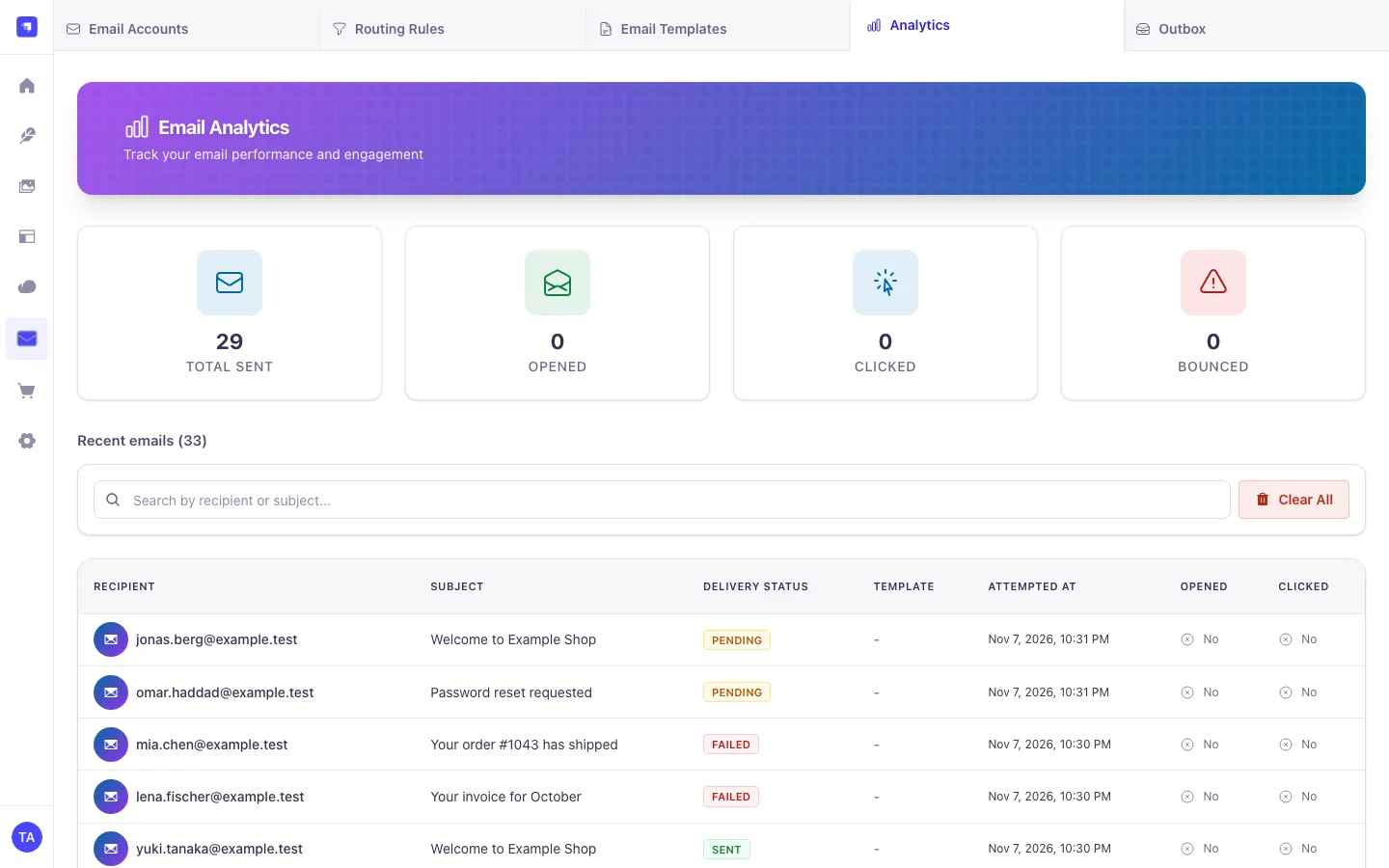 Totals and the delivery log with server-side search and paging, delivery status, opens and clicks per email.
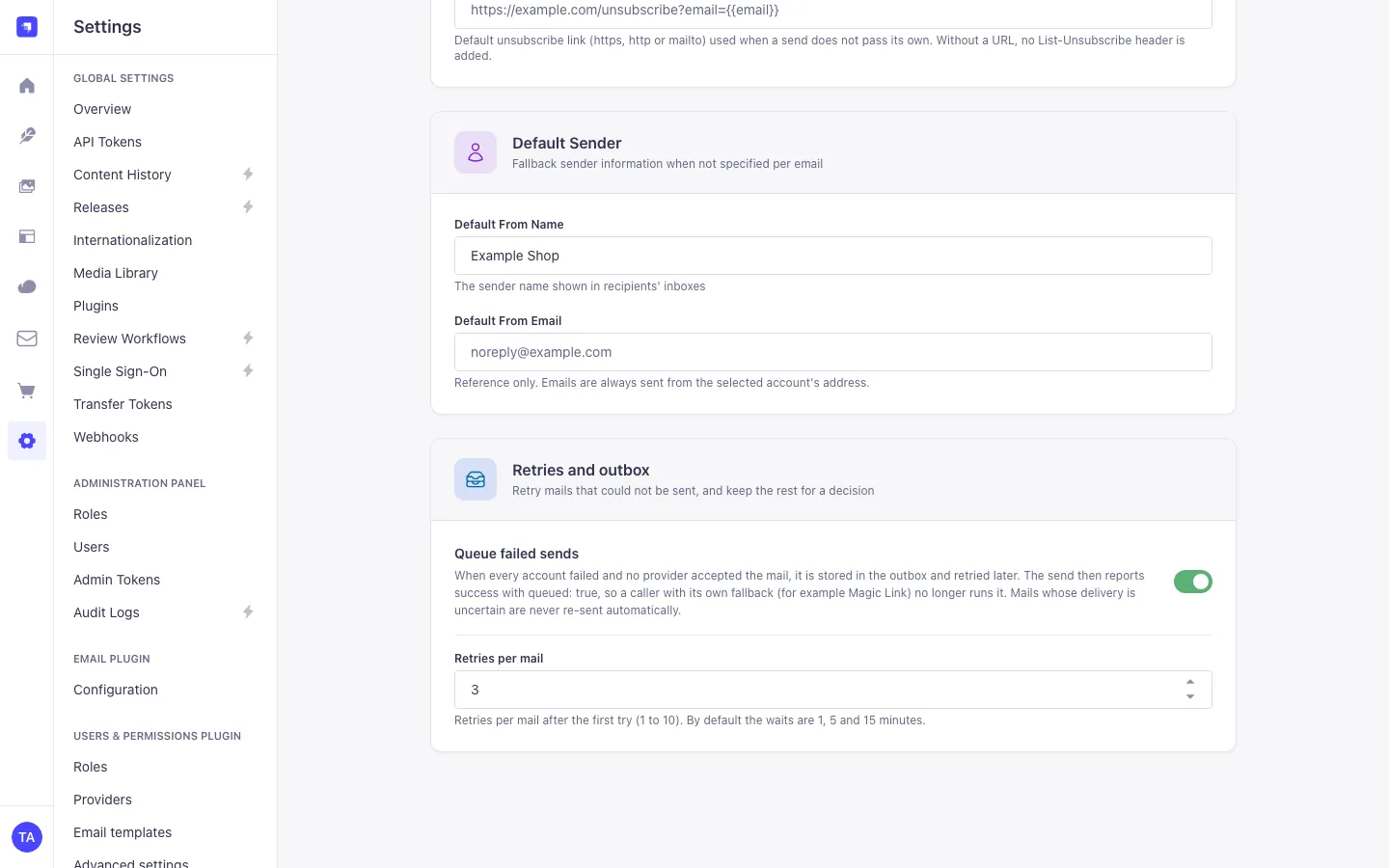 Settings → MagicMail → Plugin Settings. Tracking, unsubscribe header, default sender, and the "Retries and outbox" section.
| Accounts at 390 px | Routing rules at 390 px | Outbox at 390 px, dark |
|---|---|---|
 |
 |
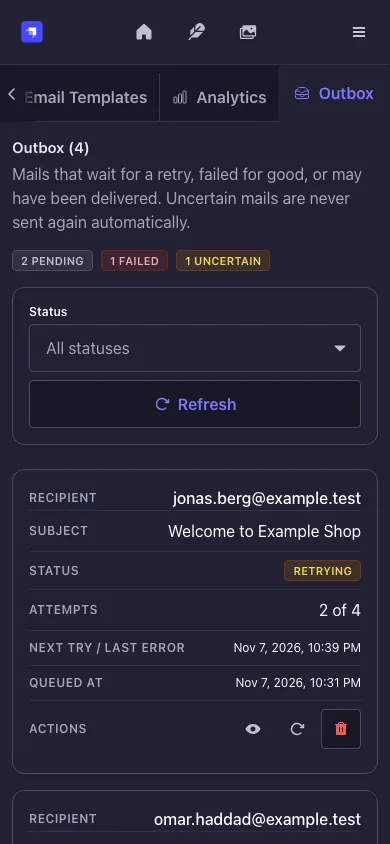 |
On narrow screens the section tabs scroll sideways; edge buttons show that more sections exist, and the active section stays in view.
MagicMail wraps the provider of @strapi/email at startup, so existing code keeps working:
await strapi.plugin('email').service('email').send({
  to: 'user@example.com',
  subject: 'Welcome to Example Shop',
  text: 'Thanks for signing up!',
  html: '<h1>Welcome!</h1><p>Thanks for signing up!</p>',
});
Both send() and sendTemplatedEmail() are routed, including Strapi's admin password-reset email and the Users & Permissions emails. MagicMail picks the account (routing rules, then priority), reserves quota, fails over when that is safe, logs the email and updates the statistics.
Fallback to the original provider. When no MagicMail account is active, or every eligible account is over its quota, the email is sent through the Strapi email provider you configured before (logged with the account name strapi-email-provider). Once a MagicMail account has attempted delivery, an error is returned to the caller and the email is not sent again through the original provider, so nothing goes out twice.
Use the router directly when you need its options, for example to force an account:
await strapi.plugin('magic-mail').service('email-router').send({
  to: 'customer@example.com',
  subject: 'Order confirmation',
  html: '<h1>Your order #12345</h1>',
  accountName: 'Transactional SMTP', // case-insensitive; never replaced by another account
  type: 'transactional',
  priority: 'high',
});
// → { success: true, accountUsed: 'Transactional SMTP', messageId: '<…>', emailId: '…' }
An explicit accountName is never swapped for another account: if that account is over quota or fails, the send fails. Router calls never use the Strapi-provider fallback; they get the error.
See Content API for POST /api/magic-mail/send and /send-message.
The same fields work for the router, the Strapi email service and POST /api/magic-mail/send.
| Field | Description |
|---|---|
to, cc, bcc |
Address, array or comma-separated list (max. 100 to, 50 cc/bcc). Display names allowed |
subject, text, html |
subject is required unless a template provides it; text or html is required. HTML is sanitised (no scripts, event handlers or javascript: URLs; email layout is kept) |
from |
Optional. Must be the sending account's address; only its display name is used |
replyTo |
A valid address |
type |
transactional (default), marketing or notification. Without type, a template's category is used |
priority |
normal (default), high or low. high adds X-Priority and Importance headers |
accountName |
Force one account |
templateId / templateReferenceId, templateData |
Render a MagicMail template by its Reference ID with Mustache data (data is accepted as an alias of templateData) |
unsubscribeUrl |
Per-email unsubscribe URL |
enableTracking: false, skipLinkTracking: true |
Disable open and click tracking, or only click tracking, for this email |
customField |
Value matched by routing rules of type Custom |
headers |
Up to 20 custom headers: X-* (except MagicMail's own) plus List-Id, Precedence, Auto-Submitted, In-Reply-To, References. Others are dropped |
attachments |
Up to 20, 25 MB each, with filename, content, contentType, encoding, cid |
userId, recipientName |
Stored on the email log |
await strapi
  .plugin('email')
  .service('email')
  .send({
    to: 'customer@example.com',
    subject: 'Invoice 12345',
    html: '<h1>Your invoice is attached</h1>',
    attachments: [
      {
        filename: 'invoice.pdf',
        content: await fs.promises.readFile(invoicePath), // read the file yourself
        contentType: 'application/pdf',
      },
      { filename: 'receipt.pdf', content: pdfBase64, encoding: 'base64' },
    ],
  });
Attachments must carry their content (a Buffer, or a string with encoding). Attachments with path or href are rejected for every provider, so MagicMail never reads server files or fetches URLs for a caller. Inline images use cid.
List-Unsubscribeis sent for marketing emails that have an unsubscribe URL, and for every email type while Settings → Unsubscribe header is on and a URL is available.- A per-email
unsubscribeUrlwins. The plugin-wide URL from the settings is used only while the toggle is on;{{email}}in it is replaced with the URL-encoded recipient (single-recipient emails only). List-Unsubscribe-Post: List-Unsubscribe=One-Click(RFC 8058) is only added forhttpsURLs.- Marketing emails get
Precedence: bulk; notification emails getAuto-Submitted: auto-generated.
MagicMail builds the redirect URI from the URL environment variable if it is set (legacy override), otherwise from Strapi's server.url (or server.absoluteUrl):
<public URL>/magic-mail/oauth/<gmail|microsoft|yahoo>/callback
The account wizard shows the exact value the server uses; register exactly that value with the provider. In production the URL must be public https; there is no localhost fallback. The localhost:1337 URIs below are for local development.
The authorization popup reports back to the admin origin (admin.url). If the admin runs on its own host, set admin.url to that absolute URL. OAuth flows are bound to the admin who started them and stored in the database (one row per flow, consumed once), so the callback may land on any Strapi instance; no sticky sessions are needed.
Reconnecting an account (revoked consent, expired refresh token): edit the account and use Reconnect with <provider> in the wizard. The provider must return the account's own mailbox. Access tokens are refreshed 60 seconds before they expire and once more if the provider rejects them; rotated refresh tokens are stored.
- In the Google Cloud Console create or select a project and enable the Gmail API.
- Create an OAuth client ID of type Web application.
- Add the redirect URI, for example
http://localhost:1337/magic-mail/oauth/gmail/callback. - In MagicMail choose Gmail, paste the client ID and secret, click Connect with Google and sign in.
Scopes: https://www.googleapis.com/auth/gmail.send, https://www.googleapis.com/auth/userinfo.email, openid. Mail is sent through the Gmail API.
- In the Azure portal open Microsoft Entra ID → App registrations → New registration.
- Copy the Application (client) ID and the Directory (tenant) ID.
- Add a Web redirect URI, for example
http://localhost:1337/magic-mail/oauth/microsoft/callback. - API permissions (Microsoft Graph, Delegated):
Mail.Send,User.Read,offline_access,openid,email. Grant admin consent. - Under Certificates & secrets create a client secret and copy its Value (not the secret ID).
- In MagicMail choose Microsoft 365, enter tenant ID, client ID and secret, click Connect with Microsoft.
The tenant ID must be a GUID, a domain, common, organizations or consumers. Mail is sent through Microsoft Graph sendMail.
- Create an app at developer.yahoo.com/apps.
- Redirect URI, for example
http://localhost:1337/magic-mail/oauth/yahoo/callback. - Permissions: Mail (read/write) and OpenID Connect (scopes
openid email mail-w). - In MagicMail choose Yahoo Mail, paste client ID and secret and click Connect with Yahoo.
Mail is sent over SMTP with XOAUTH2.
| Field | Example |
|---|---|
| Host | smtp.example.com |
| Port | 587 (STARTTLS) or 465 (turn on Use SSL/TLS encryption) |
| Username/password | Mailbox credentials or an app password |
Common hosts: Gmail smtp.gmail.com:587 (app password), Outlook.com smtp-mail.outlook.com:587, Microsoft 365 smtp.office365.com:587.
TLS 1.2 or newer is required and certificates are verified. For a local mail catcher (Mailpit, MailHog) set "allowInsecure": true in the account config; it is honoured outside NODE_ENV=production, or for loopback hosts.
Optional DKIM signing (account config):
{
  "dkim": {
    "domainName": "example.com",
    "keySelector": "default",
    "privateKey": "-----BEGIN PRIVATE KEY-----\n..."
  }
}
Generate a key with openssl genrsa -out dkim_private.pem 2048 and publish the public key as a TXT record at default._domainkey.example.com.
The provider value nodemailer is an alias of smtp.
- In SendGrid go to Settings → API Keys and create a key with the Mail Send permission.
- In MagicMail choose SendGrid and paste the key. The sender address must be verified in SendGrid.
- In Mailgun copy your Private API key and your verified sending domain. Note the region the domain was created in (US or EU).
- In MagicMail choose Mailgun, enter the domain (for example
mg.example.com), pick the region and paste the key.
A Mailgun domain can only be used through the API host of its region. MagicMail stores the region as config.region and calls:
config.region |
API host |
|---|---|
us (default) |
https://api.mailgun.net |
eu |
https://api.eu.mailgun.net |
Any other value is rejected with a validation error when the account is created or updated. Accounts saved without a region keep using the US host.
| Provider | Authentication | Transport | DKIM |
|---|---|---|---|
| Gmail | OAuth 2.0 | Gmail API | by Google |
| Microsoft 365 | OAuth 2.0 (Entra ID) | Microsoft Graph sendMail |
by Microsoft |
| Yahoo Mail | OAuth 2.0 | SMTP with XOAUTH2 | by Yahoo |
| SMTP | Username and password | Nodemailer, any SMTP server | optional (see above) |
| SendGrid | API key | HTTPS API (v3) | by SendGrid |
| Mailgun | API key + domain | HTTPS API (US or EU region) | by Mailgun |
All providers support attachments, inline images (cid) and custom headers.
Routing rules send an email through a specific account when it matches a condition. Manage them under MagicMail → Routing Rules.
| Match type | Matches when |
|---|---|
| Email Type | the email type equals the value (transactional, marketing, notification) |
| Recipient | any recipient matches: @domain.com = domain, user@domain.com = exact address, anything else = substring |
| Subject | the subject contains the value (case-insensitive) |
| Template | the template name or Reference ID equals the value |
| Custom | the email's customField equals the value |
Examples:
| Rule | Match | Account | Fallback | Priority |
|---|---|---|---|---|
| Password resets first | Subject contains Password Reset |
Transactional SMTP | Gmail Support | 1000000 |
| Marketing campaigns | Email type marketing |
Marketing SendGrid | 50 | |
| VIP customers | Recipient @vip-customers.example |
Gmail Support | Transactional SMTP | 10 |
Order. Rules are checked from the highest to the lowest priority (1 to 1,000,000); rules with the same priority are checked oldest first. The first match wins. The admin list and GET /magic-mail/routing-rules show them in this order.
Account order for one email. The account of the first matching rule, then that rule's fallback account, then the accounts (and fallbacks) of the next matching rules, then the primary account, then the remaining active accounts by account priority (1 to 10, higher first). Accounts over their quota are skipped.
Failover. MagicMail moves on to the next account only when the error proves the provider did not accept the message: a refused connection or failed DNS lookup, missing credentials, an SMTP 4xx reply (for example 421 or 451, also after DATA), a 5xx reply to authentication, TLS or the envelope, a connection lost before the server answered DATA with 354, or HTTP 401/403/408/429/503. Ambiguous errors stop the send and reach the caller: a connection lost or timed out after 354, HTTP 500/502/504, network errors after the request was sent. That provider may have accepted the message, and a second account would deliver it twice. Inline sends and the outbox use the same rule (see Retries and the outbox).
Account references. Rules reference accounts by name. Creating or editing a rule with an unknown account name returns 400. Renaming an account updates its rules; deleting an account deactivates the rules that target it and clears it where it is the fallback.
Quotas. Each account can have an hourly and a daily limit (0 = unlimited). Quota is reserved atomically before dispatch, so concurrent sends cannot exceed it. Windows follow the clock hour and the calendar day in UTC; set quotaTimezone to use another IANA time zone.
Everything in the designer is included, with no tiers:
| Feature | Included |
|---|---|
| Visual designer (Unlayer) | Yes |
| Plain HTML and text editing | Yes |
| Unlimited templates | Yes |
| Mustache variables | Yes |
| Import and export | Yes |
| Template versions | Yes |
| Users & Permissions templates | Yes |
-
Go to MagicMail → Email Templates and click Create template.
-
Build the email in the Visual Designer tab, or write HTML and text in the Plain Text tab.
-
Use Mustache variables for dynamic content:
<h1>Welcome {{user.firstName}}!</h1>
<p>Thanks for joining {{company.name}}</p>
-
Save. Each template has a numeric Reference ID (for example
100) that you use when sending. It cannot be changed after creation.
The server fills {{system.date}}, {{system.year}} and {{system.unsubscribe}} (the email's unsubscribe URL); callers cannot override them.
await strapi
  .plugin('magic-mail')
  .service('email-router')
  .send({
    to: 'user@example.com',
    templateId: 100, // Reference ID
    templateData: {
      user: { firstName: 'Ada' },
      company: { name: 'Example Shop' },
    },
  });
strapi.plugin('email').service('email').send() accepts the same templateId and templateData fields. The template list also shows a ready-made code snippet per template.
Templates have a category: transactional, marketing, notification or custom. The first three become the email type when the caller passes none, so a rule Email Type = marketing also catches marketing templates.
- Version 1 is the created template. Every save that changes the content (name, subject, design, HTML, text or tags) adds a version with the saved content. Saves that only toggle
isActiveor the category add none. Restoring a version saves its content as a new version. - Export writes JSON (all templates, or the ones you select); import accepts MagicMail exports and exports of
strapi-plugin-email-designer-5. TheisActivestate is kept.
const designer = strapi.plugin('magic-mail').service('email-designer');
const versions = await designer.getVersions(templateDocumentId);
await designer.restoreVersion(templateDocumentId, versionDocumentId);
const exported = await designer.exportTemplates(); // or exportTemplates([documentId, ...])
const results = await designer.importTemplates(exported);The Core emails tab edits the Reset password and Email address confirmation templates of Users & Permissions. This needs the Users & Permissions → Email templates read/update permissions in addition to MagicMail's. Only {{ URL }}, {{ SERVER_URL }}, {{ ADMIN_URL }}, {{ CODE }}, {{ TOKEN }}, {{ USER }}, {{ USER.email }} and {{ USER.username }} are accepted; they are stored as <%= KEY %>, the syntax Users & Permissions fills in.
The visual designer embeds the Unlayer editor through react-email-editor. What that means for you:
- The editor script loads from
https://editor.unlayer.com/embed.js?2and the editor build is pinned (1.524.0). Unlayer serves the editor, so the browser of each editor user contacts Unlayer's servers. - No Unlayer
projectIdis sent unless you configure one. - Disabled: Unlayer image hosting, stock images, the AI assistant, the hosted image editor, "preview in browser" and third-party placeholder images. New image blocks use an inline placeholder.
- Images you add are uploaded to the Strapi Media Library (
POST /upload), so editors also need Media Library → Create (upload). - If the editor cannot load (CSP, offline, blocked), the page explains why and the Plain Text tab keeps working. You never need Unlayer to send templates.
Optional overrides (config/plugins.js):
module.exports = () => ({
  'magic-mail': {
    config: {
      designer: {
        projectId: null, // your own Unlayer project id (positive integer)
        scriptUrl: null, // https URL of a vetted, self-hosted copy of embed.js
        version: null, // exact Unlayer build, e.g. '1.524.0'
      },
    },
  },
});Strapi's strapi::security middleware blocks third-party scripts and frames. To use the visual designer, allow the Unlayer origin in config/middlewares.js. Do not add 'unsafe-inline' or 'unsafe-eval'.
module.exports = [
  'strapi::logger',
  'strapi::errors',
  {
    name: 'strapi::security',
    config: {
      contentSecurityPolicy: {
        useDefaults: true,
        directives: {
          'script-src': ["'self'", 'https://editor.unlayer.com'],
          'frame-src': ["'self'", 'https://editor.unlayer.com'],
          // Media Library images shown in the editor and the preview:
          'img-src': ["'self'", 'data:', 'blob:', 'https://your-media-host.example'],
        },
      },
    },
  },
  'strapi::cors',
  'strapi::poweredBy',
  'strapi::query',
  'strapi::body',
  'strapi::session',
  'strapi::favicon',
  'strapi::public',
];
With designer.scriptUrl (self-hosted embed.js) put that origin into script-src instead; the editor iframe still loads from editor.unlayer.com, so keep it in frame-src. The Unlayer script runs in the admin origin. Only allow it if you accept that trust.
Open tracking adds a 1×1 pixel; click tracking rewrites <a href> links to a redirect. Both are on by default (Settings → MagicMail → Plugin Settings) and can be turned off per email with enableTracking: false or skipLinkTracking: true.
Public URL. Tracking URLs use the Tracking base URL setting, then server.url, then server.absoluteUrl, plus your REST prefix (api.rest.prefix, default /api), for example https://cms.example.com/api/magic-mail/track/click/.... In production a loopback host (localhost, 127.0.0.1, 0.0.0.0) is never used: without a public URL, emails are sent untracked and one warning is logged.
Never tracked. Authentication and one-time-token links (password reset, confirmation, magic links, OAuth, parameters such as token, code, key, signature, session, long random values), mailto: and tel: links, and links beyond maxLinksPerEmail (100). Emails sent through the Content API are click-tracked only for hosts in tracking.allowedLinkHosts (none by default).
What is stored. Open and click events store the IP truncated to /24 (IPv4) or /48 (IPv6) and at most 512 characters of user agent; no location. Only Koa's request.ip is used, so behind a reverse proxy enable server.proxy, otherwise every recipient shares the proxy's address.
Retention. Every 6 hours MagicMail deletes events older than tracking.eventRetentionDays (90) and tracked links older than tracking.linkTtlDays (180; expired links then show the fallback page). tracking.logRetentionDays optionally deletes old email logs with their events and links. Logs contain personal data (recipient addresses); you can also delete them with Analytics → Clear All or with DELETE /magic-mail/analytics/emails?olderThan=<ISO date>.
Rate limit. The tracking routes allow 300 requests per minute and IP (counted across all instances, see Running several instances). Above that, opens and clicks are no longer recorded but recipients still get the pixel and the redirect; only above 3,000 per minute is a plain-text 429 returned.
Signing. Tracking hashes are signed with MAGIC_MAIL_TRACKING_SECRET, falling back to MAGIC_MAIL_ENCRYPTION_KEY. To rotate, keep the old values in MAGIC_MAIL_TRACKING_SECRET_PREVIOUS (comma-separated) while old emails matter.
Mention open and click tracking in your privacy notice.
SendGrid and Mailgun can tell MagicMail when a message bounced or a recipient marked it as spam. The webhooks are off until you save a verification key on the account.
SendGrid
- In SendGrid open Settings → Mail Settings → Event Webhook, enable Signed Event Webhook and copy the verification key.
- Edit the SendGrid account in MagicMail, paste the key into Signed Event Webhook verification key and save.
- Copy the Webhook URL shown in the wizard (
https://<your-strapi>/api/magic-mail/webhooks/sendgrid/<accountId>) into the SendGrid Event Webhook and select Bounced, Dropped and Spam Reports.
Mailgun
- In Mailgun copy the HTTP webhook signing key (Settings → API Security).
- Edit the Mailgun account in MagicMail, paste it into HTTP webhook signing key and save.
- Add the Webhook URL (
https://<your-strapi>/api/magic-mail/webhooks/mailgun/<accountId>) in Mailgun for Permanent Failure and Spam Complaints.
What happens. Every request is verified with the provider signature (SendGrid ECDSA over the raw body, Mailgun HMAC-SHA256) and a one-hour timestamp window; replays are ignored. A bounce sets the email log to Bounced with a reason code such as MAILGUN_BOUNCE_550, a complaint to Complaint. Provider messages and addresses are not stored. Temporary failures are ignored because the provider keeps retrying.
For other plugins. MagicMail emits magic-mail.delivery.bounced and magic-mail.delivery.complained on strapi.eventHub with { provider, messageId, reasonCode }; messageId is the id send() returned. You can also ask:
const events = await strapi
  .plugin('magic-mail')
  .service('delivery-webhooks')
  .getDeliveryEvents([messageId]); // [{ messageId, bounced, complained, reasonCode }]
The URL uses the default REST prefix /api; adjust it if you changed api.rest.prefix. Behind a reverse proxy, enable server.proxy so the rate limit (600 requests per minute and IP) sees the real client address. SMTP, Gmail, Microsoft 365 and Yahoo accounts have no bounce webhook.
| Method | Path | Auth | Purpose |
|---|---|---|---|
POST |
/api/magic-mail/send |
API token | Send through the router with all send options |
POST |
/api/magic-mail/send-message |
API token | Simple email: to, cc, bcc, subject, message/text/html, template |
GET |
/api/magic-mail/track/open/:emailId/:recipientHash |
public | Open-tracking pixel |
GET |
/api/magic-mail/track/click/:emailId/:linkHash/:recipientHash |
public | Click redirect |
POST |
/api/magic-mail/webhooks/sendgrid/:accountId |
signature | SendGrid bounce and complaint events (details) |
POST |
/api/magic-mail/webhooks/mailgun/:accountId |
signature | Mailgun bounce and complaint events (details) |
The send routes accept API tokens only. Create a Custom token under Settings → API Tokens that allows only Magic-mail → controller → send (and sendMessage if you use it). Never enable these actions for the Public or Authenticated role: a users-permissions request is rejected with 403 even if the role has the permission.
To let users-permissions roles send as well (the pre-4.0 behaviour):
// config/plugins.js
module.exports = () => ({
  'magic-mail': {
    config: { contentApi: { allowUserRoles: true } },
  },
});
With user roles allowed, the email log is always attributed to the authenticated user and a body userId is ignored. With an API token, userId must be the id or documentId of an existing users-permissions user (else 400).
The body is validated strictly: unknown fields, path/href attachments and invalid addresses return 400. Both send routes share a budget of 60 requests per minute per token, counted across all Strapi instances (see Running several instances).
curl -X POST https://cms.example.com/api/magic-mail/send \
  -H "Authorization: Bearer $MAGIC_MAIL_API_TOKEN" \
  -H "Content-Type: application/json" \
  -d '{
    "to": "customer@example.com",
    "templateId": 100,
    "templateData": { "user": { "firstName": "Ada" } },
    "type": "transactional"
  }'
{
"success": true,
"accountUsed": "Transactional SMTP",
"messageId": "<…@example.com>",
"emailId": "…"
}curl -X POST https://cms.example.com/api/magic-mail/send-message \
-H "Authorization: Bearer $MAGIC_MAIL_API_TOKEN" \
-H "Content-Type: application/json" \
-d '{ "to": "customer@example.com", "subject": "Your code", "message": "Your code is 123456." }'The response has the same shape as /send.
Errors use Strapi's envelope:
{
  "data": null,
  "error": { "status": 400, "name": "ValidationError", "message": "…", "details": {} }
}| Status | When |
|---|---|
| 400 | Invalid or unknown fields, invalid addresses, userId of a missing user |
| 401 | Invalid or expired token |
| 403 | No token, a token without the action, or a users-permissions caller while allowUserRoles is false |
| 429 | More than 60 send requests per minute (TooManyRequestsError, Retry-After header) |
| 500 | Delivery failed (no account could send, or the provider rejected the email) |
All admin routes live under /magic-mail on the Strapi server (not /api), require an authenticated administrator (admin JWT) and the capability shown. The admin UI uses them; you can call them with an admin token for automation.
| Area | Routes | Capability |
|---|---|---|
| Accounts | GET /accounts, GET /accounts/:accountId |
read |
POST /accounts, PUT /accounts/:accountId, DELETE /accounts/:accountId |
manage |
|
POST /accounts/:accountId/test, POST /test-strapi-service |
test-send |
|
| Routing rules | GET /routing-rules, GET /routing-rules/:ruleId |
read |
POST /routing-rules, PUT /routing-rules/:ruleId, DELETE /routing-rules/:ruleId |
manage |
|
| OAuth | GET /oauth/<gmail|microsoft|yahoo>/auth, POST /oauth/create-account, POST /oauth/reconnect/:accountId |
manage |
GET /oauth/<provider>/callback |
public, signed single-use state | |
| Templates | GET /designer/templates, GET /designer/templates/:id, GET /designer/templates/:id/versions, GET /designer/templates/:id/download, POST /designer/render/:templateReferenceId, POST /designer/export, GET /designer/stats, GET /designer/editor-config |
read |
POST /designer/templates, PUT/DELETE /designer/templates/:id, POST /designer/templates/:id/duplicate, POST /designer/import, version restore/delete routes |
manage |
|
POST /designer/templates/:id/test-send |
test-send |
|
GET/PUT /designer/core/:coreEmailType |
read/manage + users-permissions email-template permission |
|
| Analytics | GET /analytics/stats, GET /analytics/emails, GET /analytics/emails/:emailId, GET /analytics/users/:userId |
read |
DELETE /analytics/emails/:emailId, DELETE /analytics/emails |
manage |
|
GET /analytics/debug (only with MAGIC_MAIL_ENABLE_DEBUG_ENDPOINT=true, never in production) |
read |
|
| Outbox | GET /outbox, GET /outbox/:documentId, GET /analytics/queue-stats |
queue.read |
POST /outbox/:documentId/retry, POST /outbox/:documentId/discard, POST /outbox/:documentId/mark-sent, DELETE /outbox |
queue.manage |
|
| Settings | GET /settings / PUT /settings |
read / manage |
Test sends (/accounts/:accountId/test, /test-strapi-service, /designer/templates/:id/test-send) are limited to 10 per minute per admin.
POST /magic-mail/routing-rules
Authorization: Bearer <admin JWT>
Content-Type: application/json

{
  "name": "Marketing campaigns",
  "matchType": "emailType",
  "matchValue": "marketing",
  "accountName": "Marketing SendGrid",
  "fallbackAccountName": "Transactional SMTP",
  "priority": 50,
  "isActive": true
}
{
"data": {
"documentId": "…",
"name": "Marketing campaigns",
"matchType": "emailType",
"priority": 50,
"…": "…"
},
"message": "Routing rule created successfully"
}matchType is one of emailType, recipient, subject, template, custom. An unknown accountName or fallbackAccountName returns 400.
GET /magic-mail/accounts{
"data": [
{
"documentId": "…",
"name": "Transactional SMTP",
"provider": "smtp",
"fromEmail": "noreply@example.com",
"isActive": true,
"isPrimary": true,
"priority": 9,
"dailyLimit": 500,
"hourlyLimit": 0,
"emailsSentToday": 128,
"totalEmailsSent": 18342
}
],
"meta": { "count": 1 }
}Credentials are never returned. GET /accounts/:accountId returns ******** for each stored secret; send that exact value back in PUT to keep a secret. Changing provider, host, port, user, clientId, tenantId, domain or allowInsecure requires the secrets again (400 otherwise, with the fields in details.config).
GET /magic-mail/analytics/emails?search=order&deliveryStatus=sent&page=1&pageSize=25{
"success": true,
"data": [
{
"emailId": "…",
"recipient": "user01@example.com",
"subject": "Your order #1001 has shipped",
"deliveryStatus": "sent",
"openCount": 0,
"clickCount": 0
}
],
"pagination": { "page": 1, "pageSize": 25, "pageCount": 1, "total": 1 }
}search looks in recipient, subject and template name; pageSize is capped at 100.
MagicMail registers six admin actions under Settings → Administration Panel → Roles → Plugins → MagicMail:
| Action | Grants |
|---|---|
plugin::magic-mail.access |
The MagicMail menu entry and page. No API access by itself |
plugin::magic-mail.read |
Read accounts, routing rules, templates, analytics and settings; render and export templates; the settings link |
plugin::magic-mail.manage |
Create, update and delete accounts, rules, templates, logs and settings; OAuth setup |
plugin::magic-mail.test-send |
Send test emails (account test, Strapi-service test, template test); 10 per minute per admin |
plugin::magic-mail.queue.read |
The Outbox tab and queue statistics (no mail content) |
plugin::magic-mail.queue.manage |
Retry, discard, mark as sent and delete outbox mails |
Typical roles:
- Read-only:
access+read - Editor:
access+read+manage - Tester:
access+read+test-send
When upgrading to 4.4, every role that already had read gets queue.read and every role with manage gets queue.manage, once at startup. Super admins always have both.
Editing the Users & Permissions templates also needs the users-permissions email-template permissions; uploading images in the visual editor needs Media Library → Create (upload). Details: docs/permission-migration.md.
| Variable | Required | Purpose |
|---|---|---|
MAGIC_MAIL_ENCRYPTION_KEY |
yes, unless NODE_ENV is unset, development or test |
Credential encryption key (32+ bytes). Keep it stable and backed up |
MAGIC_MAIL_ENCRYPTION_KEY_PREVIOUS |
no | Previous key during a rotation (decrypt only; saving an account re-encrypts it) |
MAGIC_MAIL_OAUTH_STATE_SECRET |
no | OAuth state signing secret (default: derived from the encryption key) |
MAGIC_MAIL_TRACKING_SECRET |
no | Tracking hash secret (default: derived from the encryption key) |
MAGIC_MAIL_TRACKING_SECRET_PREVIOUS |
no | Comma-separated old tracking secrets that stay valid |
URL |
no | Legacy override of the OAuth callback base URL (default: server.url) |
MAGIC_MAIL_ENABLE_DEBUG_ENDPOINT |
no | true enables GET /magic-mail/analytics/debug outside production |
Without MAGIC_MAIL_ENCRYPTION_KEY, a development key derived from ADMIN_JWT_SECRET/APP_KEYS is used only when NODE_ENV is unset, development or test; rotating those secrets then makes stored credentials unreadable. Any other environment (for example staging) refuses to start without the key.
Also set Strapi's server.url to your public URL (OAuth redirects, tracking links) and server.proxy.koa: true behind a reverse proxy.
All keys are optional and validated at startup (an invalid value stops Strapi with a clear message):
// config/plugins.js
module.exports = () => ({
  'magic-mail': {
    enabled: true,
    config: {
      debug: false, // info/debug logs; warnings and errors are always logged
      contentApi: {
        allowUserRoles: false, // true = users-permissions roles may use the send routes
      },
      quotaTimezone: 'UTC', // IANA zone for hourly/daily quota windows
      tracking: {
        eventRetentionDays: 90, // raw open/click events; 0 = keep forever
        linkTtlDays: 180, // tracked links redirect this long; 0 = forever
        logRetentionDays: 0, // email logs (with events and links); 0 = keep forever
        maxLinksPerEmail: 100, // further links stay untracked
        allowedLinkHosts: [], // e.g. ['example.com'] (subdomains included)
        anonymizeIp: true, // store /24 (IPv4) or /48 (IPv6) only
      },
      designer: {
        projectId: null, // optional Unlayer project id
        scriptUrl: null, // optional https URL of the Unlayer loader
        version: null, // optional exact Unlayer build
      },
      rateLimit: {
        store: 'database', // 'database' (shared by all instances), 'redis' or 'memory'
        // redis: new Redis(process.env.REDIS_URL), // ioredis or node-redis v4+ client, store: 'redis'
        redisPrefix: 'magic-mail:rl:',
      },
      queue: {
        worker: true, // see "Retries and the outbox" for every key
      },
    },
  },
});| Key | Type | Default | Effect |
|---|---|---|---|
debug |
boolean | false |
Info and debug logs; warnings and errors are always logged |
contentApi.allowUserRoles |
boolean | false |
Let users-permissions roles call the Content API send routes |
quotaTimezone |
IANA zone | 'UTC' |
Time zone of the hourly and daily quota windows |
tracking.eventRetentionDays |
integer >= 0 | 90 |
Delete open and click events after this many days (0 = keep) |
tracking.linkTtlDays |
integer >= 0 | 180 |
Tracked links redirect this long (0 = forever) |
tracking.logRetentionDays |
integer >= 0 | 0 |
Delete email logs with their events and links (0 = keep) |
tracking.maxLinksPerEmail |
integer >= 0 | 100 |
Further links stay untracked |
tracking.allowedLinkHosts |
string[] | [] |
Hosts that may be click-tracked (see below) |
tracking.anonymizeIp |
boolean | true |
Store IPs truncated to /24 (IPv4) or /48 (IPv6) |
designer.projectId |
positive integer or null |
null |
Your own Unlayer project id |
designer.scriptUrl |
https URL or null |
null |
Self-hosted Unlayer embed.js |
designer.version |
string or null |
null |
Exact Unlayer build |
rateLimit.store |
'database', 'redis', 'memory' |
'database' |
Where rate-limit counters live (details) |
rateLimit.redis |
Redis client | none | ioredis or node-redis v4+ client for store: 'redis' |
rateLimit.redisPrefix |
string | 'magic-mail:rl:' |
Key prefix in Redis |
queue.* |
object | see Retries and the outbox | Outbox worker, retries, limits and retention |
allowedLinkHosts empty means: every host may be click-tracked for admin, service and native sends, and no host for Content-API sends. When the list is set, it applies to all sends.
Settings → MagicMail → Plugin Settings, stored in the database (GET/PUT /magic-mail/settings):
| Setting | Default | Effect |
|---|---|---|
| Link tracking / Open tracking | on | Rewrite links / add the open pixel |
| Tracking base URL | empty | Public base for tracking URLs (else server.url) |
| Default from name | empty | Display name when neither the account nor the caller sets one |
| Default from email | empty | Reference only; emails always go out from the selected account's address |
| Unsubscribe header | on | Send List-Unsubscribe for every email type and use the plugin-wide URL |
| Unsubscribe URL | empty | Plugin-wide unsubscribe URL; {{email}} is replaced per recipient |
trackingFallbackUrl (API) |
empty | Where expired or unknown tracking links redirect; empty shows a static page |
| Queue failed sends | off | Store sends that failed after failover and retry them (details) |
| Retries per mail | 3 | Retries after the first try, 1 to 10 |
Name (unique), description, provider, from email and name, reply-to, encrypted credentials (SMTP password, API key, OAuth tokens, optional DKIM key), daily and hourly limit (0 = unlimited), priority (1 to 10, higher preferred), active and primary flags.
const router = strapi.plugin('magic-mail').service('email-router');
await router.send({ to, subject, html });

const accounts = await strapi.plugin('magic-mail').service('account-manager').getAllAccounts();

// Test one account (also works for inactive accounts)
await strapi
  .plugin('magic-mail')
  .service('account-manager')
  .testAccount(accountDocumentId, 'you@example.com', { priority: 'high', type: 'marketing' });

const designer = strapi.plugin('magic-mail').service('email-designer');
const rendered = await designer.renderTemplate(100, { user: { firstName: 'Ada' } });
const stats = await designer.getStats(); // { total, active, inactive, byCategory, ... }MagicMail can retry mails that were not sent: up to 3 retries per mail (after 1, 5 and 15 minutes), kept in a database outbox that is safe with several replicas and pm2 workers. It is off by default. Without one of the two switches below, send() behaves exactly as before: same code path, same result, same errors.
-
Per send: pass
queue: true. The mail is prepared (template, sanitizing, tracking, delivery log) and stored; a worker sends it within about a second.const result = await strapi .plugin('magic-mail') .service('email-router') .send( { to: 'user@example.com', subject: 'Welcome', templateReferenceId: 'welcome' }, { queue: true, idempotencyKey: 'signup-42:welcome', // optional: the same key is queued once notAfter: new Date(Date.now() + 60 * 60 * 1000), // optional: never send later than this } ); // { success: true, queued: true, status: 'pending', outboxId, emailId, accountUsed: null, messageId: null }
The Content API accepts the same optional fields:
POST /api/magic-mail/sendwith"queue": trueand"idempotencyKey": "..."(letters, digits,. _ : -, up to 128 characters). A repeated key returns the first row withduplicate: true. Keys are scoped by caller: each API token (and, withcontentApi.allowUserRoles, each user) has its own key space, so one integration can never suppress or read another's mail with a guessed key. Server code shares one key space persource(defaultservice); passidempotencyScopeto separate callers there too. -
For failed sends (owner setting): Settings → MagicMail → Plugin Settings → Retries and outbox → Queue failed sends. A send still runs inline with failover as before. When it fails, the error is classified:
| Outcome | What happens | The caller sees |
|---|---|---|
| No provider accepted the mail (SMTP 4xx, refused connection, auth, HTTP 401/403/408/429/503) | Stored as pending, retried after 1, 5, 15 minutes |
{ success: true, queued: true, status: 'pending', outboxId, ... } |
| No account free (none active, every account over quota) | Stored as pending, retried at the next quota hour without using up a retry |
same |
| The provider may have accepted it (connection lost after the message was sent, HTTP 500/502/504, timeout) | Stored as uncertain, never re-sent automatically |
the original error, unchanged, with error.magicMailOutboxId |
| Permanent refusal (SMTP 5xx, HTTP 400/404/413/422, invalid input) | Not stored | the original error, unchanged |
Sends to an explicit account (accountName, admin account test) and test sends are never captured. Native Strapi emails (password reset, confirmation) follow the same rules; when no MagicMail account can take them they still go to the original Strapi provider first, as before. If that provider fails too, the mail is captured only when every MagicMail account is over its quota (a later quota hour can deliver it). With no active MagicMail account at all the worker could never send it, so the provider's error reaches Strapi unchanged, as in 4.3. queue: false turns capture off for one call.
"Retries per mail" (1 to 10, default 3) is the number of retries after the first try. A queue: true mail gets the first try plus that many retries.
Magic Link and other callers with their own fallback. With Queue failed sends on, a temporary failure resolves as queued instead of throwing, so a caller's own fallback (for example Magic Link's fallback to another provider) no longer runs, and the mail can arrive minutes later. Login links and codes expire. Call
send(..., { queue: false })for such mails, or passnotAfterset to the token expiry: MagicMail never sends a queued mail afternotAfter(it ends asfailed/EXPIRED).
A message can be lost in the gap between "the provider has it" and "we were told so". SMTP connections that drop after the message was transmitted, and HTTP APIs that answer 500, 502 or 504 or time out after the request was sent (503 means the request was not handled, RFC 9110 15.6.4, and is retried), may or may not have delivered it. None of the supported providers offers an idempotency key (SendGrid v3 Mail Send, Mailgun messages, Microsoft Graph sendMail, Gmail users.messages.send), so a retry could send a duplicate. MagicMail therefore records these as uncertain and leaves the decision to a person. Every queued attempt uses the same Message-ID and an X-MagicMail-Outbox header, which helps to find the mail in the provider's log and lets some mail clients collapse an accidental duplicate (a mitigation, not a guarantee).
For SMTP the stage is known exactly: a private logger watches nodemailer's transaction log for the server's 354 reply to DATA (it keeps a yes/no flag only, never the text). A drop before 354 is safe to retry; a drop after it is uncertain, whatever system code (ECONNRESET, EHOSTUNREACH, ...) the socket reported. For HTTP providers a network error counts as "not accepted" only when it proves the connect phase (refused connection, failed DNS lookup, connect timeout, or an unreachable host raised by connect()); any other network error is uncertain.
Recording the result is just as careful. If the database write that marks a mail sent fails after the provider accepted it, MagicMail retries the write a few times and otherwise leaves the claim to expire, so the mail ends as uncertain, never as pending. Any error after a provider was contacted that did not come from the provider itself (database, bookkeeping) is treated as uncertain.
MagicMail → Outbox lists pending, retrying, failed, uncertain, sent and discarded mails with recipient, subject, attempts, next try or last error code. Per row:
- Details: the error history (time, account, error code, class). The provider's error text and the mail content are never stored or shown.
- Retry now: sends it again within seconds. A pending mail keeps its remaining automatic retries; a failed or uncertain mail gets one more attempt. For an uncertain mail the dialog states the duplicate risk.
- Mark as sent: for an uncertain mail after checking the provider's log. Nothing is sent.
- Discard: the mail is not sent and its content is deleted.
Reading needs plugin::magic-mail.queue.read, the actions need plugin::magic-mail.queue.manage (see Permissions). GET /magic-mail/analytics/queue-stats returns counts per status, the age of the oldest pending mail, retries and failures for 24 hours and 7 days, an attempts histogram, the top error codes and the average queue latency.
strapi.eventHub emits magic-mail.queue.enqueued, .retry-scheduled, .sent, .failed, .uncertain, .discarded and .resolved after each write, with { outboxId, emailId, status, attempts, maxAttempts, code, errorClass, accountName, source }. No addresses, subjects or content. A failing listener never changes the outbox.
- Table
magic_mail_outbox(content typeplugin::magic-mail.outbox-message, hidden in the Content Manager). The prepared mail is stored encrypted (AES-256-GCM, own subkey ofMAGIC_MAIL_ENCRYPTION_KEY, bound to its row);MAGIC_MAIL_ENCRYPTION_KEY_PREVIOUSkeeps queued mails readable during a key rotation. - The content is deleted when the mail is sent or discarded. Failed and uncertain mails keep it for 14 days (so they can still be retried), then the row stays without content until it is 30 days old. Sent and discarded rows are removed after 7 days.
- Mails larger than
queue.maxPayloadBytes(default 10 MiB of prepared JSON, at most 20 MiB) are not queued:queue: truefails with a validation error, a failed send is not captured and throws as before. strapi.plugin('magic-mail').service('queue').forgetRecipient(address)deletes the queued mails of one recipient (GDPR erasure).
// config/plugins.js
module.exports = () => ({
  'magic-mail': {
    config: {
      queue: {
        worker: true, // false: this process never sends queued mail (e.g. web-only replicas)
        pollIntervalMs: 10_000, // plus up to 50 % jitter
        batchSize: 5, // mails claimed per poll
        concurrency: 2, // parallel queued sends per process
        leaseMs: 180_000, // claim timeout; above the bounded send time (30 s connect + 60 s socket, 30 s OAuth token refresh)
        backoffMs: [60_000, 300_000, 900_000], // wait before retry 1, 2, 3 (+/- jitterRatio)
        jitterRatio: 0.2,
        maxAgeHours: 24, // default notAfter
        maxPayloadBytes: 10 * 1024 * 1024,
        maxDispatchPerMinute: 120, // queued sends per minute across ALL processes
        retention: { sentDays: 7, unresolvedDays: 14, rowDays: 30 },
      },
    },
  },
});| Key | Default | Allowed | Effect |
|---|---|---|---|
queue.worker |
true |
boolean | false: this process never sends queued mail |
queue.pollIntervalMs |
10000 |
1000 to 3600000 | Poll interval, plus up to 50 % jitter |
queue.batchSize |
5 |
1 to 100 | Mails claimed per poll |
queue.concurrency |
2 |
1 to 20 | Parallel queued sends per process |
queue.leaseMs |
180000 |
30000 to 3600000 | Claim timeout; must exceed the bounded send time |
queue.backoffMs |
[60000, 300000, 900000] |
1 to 10 values, 1000 to 86400000 each | Wait before retry 1, 2, 3, ... |
queue.jitterRatio |
0.2 |
0 to 0.9 | Random spread of each wait |
queue.maxAgeHours |
24 |
1 to 720 | Default notAfter of a queued mail |
queue.maxPayloadBytes |
10485760 (10 MiB) |
1024 to 20971520 | Larger mails are not queued |
queue.maxDispatchPerMinute |
120 |
1 to 100000 | Queued sends per minute across all processes |
queue.retention.sentDays |
7 |
1 to 3650 | Remove sent and discarded rows |
queue.retention.unresolvedDays |
14 |
1 to 3650 | Keep the content of failed and uncertain mails |
queue.retention.rowDays |
30 |
1 to 3650 | Remove failed and uncertain rows |
Invalid values stop Strapi at startup with a message naming the key.
The outbox needs nothing beyond the multi-instance setup: one database and identical secrets (MAGIC_MAIL_ENCRYPTION_KEY must be the same everywhere, or a worker can not read a mail queued on another replica).
- Every process runs a worker. With 2 replicas x
pm2 -i 4that is 8 workers. They claim mails withSELECT ... FOR UPDATE SKIP LOCKEDon PostgreSQL (MySQL 8 the same inside a transaction; SQLite and older MySQL/MariaDB a conditional update per row), so no mail is claimed twice. Every later write is fenced by the claim token. - Load: idle, each process runs one indexed query every 10 to 15 seconds (about 40 per minute for 8 processes). At 20 to 30 mails per minute the default
batchSize/concurrencyleaves ample headroom;maxDispatchPerMinutekeeps a backlog after an outage from eating the hourly account quota live traffic needs. - Crashes and deploys: a process killed after claiming but before sending gives the mail back after
leaseMs; one killed while a provider had the mail turns ituncertain(no automatic re-send). Rolling deploys therefore never lose or double-send a queued mail, but can leave an uncertain one to check. - Optional split: set
queue.worker: falsethrough an environment-based config on replicas that should only serve HTTP. At least one process must keep the worker on. - Connection pool: the worker uses the same Strapi pool; the
processes x pool.maxrule above still applies. - MySQL: statements with
SKIP LOCKEDare unsafe for statement-based replication; use row-based replication (binlog_format=ROW, the MySQL 8 default).max_allowed_packetmust exceed about 1.4xmaxPayloadBytes.
- Retries are evaluated against the routing rules at retry time, prefer another account than the one that failed last (the same one if it is the only one), and never replace an explicitly requested account.
- The worker does not use the original Strapi email provider as a fallback. That is why a native Strapi mail is not captured when no MagicMail account exists at all.
- Queued OAuth sends (Gmail, Microsoft, Yahoo) bound the token refresh to 30 seconds and re-check the claim after it, right before the provider request. A process that lost its claim during a slow refresh does not send.
- Inline failover between accounts uses the same strict rules as the queue. Up to 4.4.0 it also moved on after a connection lost after DATA and after HTTP 500/502, which in rare cases delivered a mail twice (see Migration notes).
- Outbox indexes are declared through Strapi's content-type
indexeskey, which Strapi 5.61 supports but does not document; a test pins it.
MagicMail works with several Node processes that share one database, for example 2 Railway replicas with pm2 -i 4 each (8 processes) on one PostgreSQL. No sticky sessions and no Redis are required: everything that has to be consistent across processes lives in the database.
| Concern | How it is kept correct across processes |
|---|---|
| Account hourly/daily quotas | One conditional UPDATE ... WHERE count < limit per send. Windows only move forward, so a replica whose clock lags a little never resets a window another one opened. |
| Rate limits (send, test send, webhooks, tracking) | Fixed-window counters in magic_mail_rate_limits, one atomic upsert (INSERT ... ON CONFLICT DO UPDATE). Tracking routes only touch the database after a caller's first max / 10 hits per process. |
| OAuth flows (state, PKCE verifier) | One row per flow in magic_mail_oauth_pending; the callback consumes it with one conditional DELETE, so a duplicated callback can not be accepted twice. |
| OAuth token refresh | One refresh per account at a time (database lease). Other processes wait briefly and then use the stored, refreshed token; a rotated refresh token is never overwritten by an older one. |
| Bounce and complaint webhooks | A provider retry that reaches another process while the first one still works is acknowledged without work (claim row in magic_mail_claims, primary key). Listeners run once per event. |
| Open and click counters | Single UPDATE ... SET count = count + 1, no read-modify-write. |
| Template version numbers, primary account, unique names | Written under a short database lease, so two admins saving at the same moment on different instances get distinct version numbers and one primary account. |
| Users & Permissions email templates, plugin flags | Compare-and-set update of the core-store row; concurrent saves of the reset-password and confirmation templates keep both changes. |
| Background jobs (quota refresh, retention, one-time migrations) | Every process keeps its timers, but each run takes a database lease, so one process does the work per interval. If it dies, another one takes over on its next tick. |
| Plugin settings cache | Cached for 10 seconds per process and re-checked against the row's updated_at about once a second, so a change made on one instance applies everywhere within about a second. |
The three coordination tables (magic_mail_claims, magic_mail_rate_limits, magic_mail_oauth_pending) are created at startup with plain CREATE TABLE and work on PostgreSQL, MySQL and SQLite. Strapi does not touch tables it did not create. Expired rows are removed every five minutes.
-
One database for all processes. Point every replica at the same PostgreSQL (
DATABASE_URLorDATABASE_HOSTand friends). SQLite only works for several processes on one machine and one file. MySQL uses the same portable SQL but has not been load-tested with several processes yet.- The database user needs the
CREATE TABLEright Strapi already uses (for the three coordination tables). - Every process opens its own connection pool. Keep
processes x pool.max(connection.poolinconfig/database.js) below the server'smax_connections; for 8 processes on a small Railway PostgreSQL, apool: { min: 0, max: 5 }is a safe start.
- The database user needs the
-
Identical secrets everywhere. Set these as Railway shared variables (or one
.envused by every pm2 worker):NODE_ENV=production APP_KEYS=... # same value and order on every replica MAGIC_MAIL_ENCRYPTION_KEY=... # credentials encrypted on one replica are read on another MAGIC_MAIL_TRACKING_SECRET=... # tracking links signed on one replica are verified on another MAGIC_MAIL_OAUTH_STATE_SECRET=... # OAuth state signed on one replica is verified on another
At startup every process logs
[magic-mail] Secret fingerprints (must match on every instance): encryption=… tracking=… oauthState=…. The values are short one-way fingerprints; if two instances print different values, their secrets differ. -
Real client IPs behind the proxy. Railway, Render, Fly and load balancers forward the client address in
X-Forwarded-For. Withoutproxy, every unauthenticated caller shares the proxy's address and therefore one rate-limit quota:// config/server.js module.exports = ({ env }) => ({ host: env('HOST', '0.0.0.0'), port: env.int('PORT', 1337), url: env('PUBLIC_URL'), // public https URL (OAuth redirects, tracking links) proxy: { koa: true }, app: { keys: env.array('APP_KEYS') }, });
-
pm2 cluster mode. No sticky sessions are needed. pm2's cluster mode runs a Node.js script, so point it at the Strapi CLI instead of
npm. Exampleecosystem.config.js:module.exports = { apps: [ { name: 'strapi', script: './node_modules/@strapi/strapi/bin/strapi.js', args: 'start', exec_mode: 'cluster', instances: 4, env: { NODE_ENV: 'production' }, }, ], };
In a container (Railway, Docker) start it in the foreground with
pm2-runtime start ecosystem.config.jsas the start command. All workers of one replica share itsPORT; pm2 spreads the requests over them. -
Railway replicas. Set the replica count in the service settings (for example 2). Every replica runs the same start command and gets the same variables, so with
instances: 4you get 8 processes. Railway's proxy balances requests across replicas without stickiness, which MagicMail does not need.On a brand-new, empty database, deploy with one replica first. Strapi itself creates its system tables (
strapi_migrations, ...) at the first boot, and several processes doing that at the same moment can crash withduplicate key value violates unique constraint "pg_class_relname_nsp_index". This is Strapi core, not MagicMail; a restart fixes it. Once the schema exists, scale up. -
Optional: Redis for the rate limiter. The database store is enough for most installs. If you already run Redis, create the client yourself and pass it in; on a Redis error the database store is used:
// config/plugins.js
const Redis = require('ioredis');

module.exports = ({ env }) => ({
  'magic-mail': {
    config: {
      rateLimit: env('REDIS_URL')
        ? { store: 'redis', redis: new Redis(env('REDIS_URL')) }
        : { store: 'database' },
    },
  },
});
rateLimit.store: 'memory'restores the per-process limiter of earlier versions (single instance only).
- A process that crashes between reserving a quota slot and sending keeps that slot used until the window ends.
- Rate limits are fixed windows, so a caller can send up to twice the limit across a window boundary. Up to
max / 10 - 1tracking hits per process and window may go uncounted. - Changing
quotaTimezoneto a zone that is behind the old one keeps counting in the old window until the new zone catches up (stricter, never looser). - Unique account names, rule names and template reference ids are enforced by the application under a lease, not by a database index. Duplicates created by earlier versions stay until you rename them.
- Content-API sends that fail because the account quota is used up or the
accountNameis unknown return 500 "Failed to send email", as in earlier versions. - Strapi's own Users & Permissions settings page still writes its email templates without compare-and-set; a save there at the same moment as a MagicMail save can still win.
npm run test:multi-instance starts 8 processes against one SQLite file and checks the invariants above (one claim winner, no lost updates, shared rate-limit counts, each OAuth flow consumed once, compare-and-set store writes, atomic counters, quota limits). Set MAGIC_MAIL_TEST_PG_URL=postgres://user@host:5432/throwaway_db to run the same suite against PostgreSQL. The same command runs the outbox proof: 8 processes, 500 queued mails against a local scripted SMTP server, each accepted exactly once, retries bounded, uncertain mails never re-sent, one row per idempotency key, racing admin actions and SIGKILL during claim and dispatch.
- Credentials. SMTP passwords, API keys, OAuth tokens and DKIM keys are encrypted with AES-256-GCM (key derived from
MAGIC_MAIL_ENCRYPTION_KEYwith HKDF). The admin API returns the placeholder********instead of a secret, and changing the host, user, provider or OAuth client requires the secret again. - Admin routes. Every route needs an authenticated administrator plus the capability listed in Permissions.
accessonly shows the menu entry. - Content API. The send routes accept API tokens only (users-permissions roles only with
contentApi.allowUserRoles), reject unknown fields, file-path and URL attachments, and share 60 requests per minute per token across all instances. Never enable them for the Public role. - What goes out. HTML is sanitised,
fromis pinned to the sending account's address, custom headers are allowlisted, and SMTP requires TLS 1.2 or newer with certificate checks (unlessallowInsecureis set on a non-production or loopback host). - OAuth. Callbacks are public but use a signed, single-use state with PKCE, bound to the admin who started the flow and stored in the database.
- Webhooks. SendGrid and Mailgun requests are verified with the provider signature and a one-hour timestamp window; replays are ignored and provider messages and addresses are not stored.
- Tracking. Open and click events keep IPs truncated to /24 or /48 and no location, and expire after 90 days (links after 180 days). Authentication links are never tracked. Mention tracking in your privacy notice.
- Outbox. Queued mails are stored encrypted and deleted once sent or discarded; the admin API and the Outbox tab never show mail content.
forgetRecipient(address)removes a recipient's queued mails. - Logs. MagicMail's log lines carry error names and codes, not recipient addresses or message content.
- Third parties. Mails go only to the providers you configure. The visual template editor loads Unlayer's editor in the admin's browser (see the visual editor and privacy); the plain HTML editor needs no third party.
- Supply chain. Releases are published from GitHub Actions with npm provenance.
Reporting a vulnerability: use GitHub private vulnerability reporting. Please do not open a public issue for security problems.
Email not received
- Look for
[magic-mail]warnings and errors in the Strapi log (always logged; setdebug: truefor details). - Check the account: active, the Test action succeeds, today's usage is below the limit.
- Check Analytics: the log shows status, the account used and, for failures, the error.
- Check the spam folder; new senders often land there.
"Could not connect to the mail server" on an SMTP test: check host, port and TLS (587 STARTTLS, 465 with Use SSL/TLS encryption). Self-signed certificates are rejected unless allowInsecure is set on a non-production or loopback host.
OAuth popup fails or reports a redirect mismatch
- Register exactly the redirect URI the wizard shows.
- Production:
server.urlmust be publichttps. - Admin on its own host: set
admin.url. - Microsoft: all five delegated permissions with admin consent, correct tenant ID, client secret not expired.
- Several Strapi instances: every instance needs the same
MAGIC_MAIL_ENCRYPTION_KEY,MAGIC_MAIL_OAUTH_STATE_SECRETandAPP_KEYS(an "Invalid state signature" means they differ; compare the fingerprints in the startup log, see Running several instances).
Edit wizard says "Stored credentials cannot be decrypted": the encryption key changed. Set the old key in MAGIC_MAIL_ENCRYPTION_KEY_PREVIOUS, or enter the secrets again.
Content API returns 403: use an API token with the send/sendMessage action; users-permissions roles are rejected unless contentApi.allowUserRoles is true.
Content API returns 400: the response details name the field. Common causes: unknown fields (for example phoneNumber or channel from 3.x), path attachments, a from that is not the account's address.
Links are not tracked: set Tracking base URL or server.url to a public URL; for Content-API sends add the link hosts to tracking.allowedLinkHosts. Authentication links are never tracked.
Visual designer does not load: add https://editor.unlayer.com to script-src and frame-src (see Content Security Policy). The Plain Text tab works without it.
DMARC failures with a custom domain: publish SPF (for example v=spf1 include:_spf.google.com ~all), add DKIM (provider or SMTP DKIM config) and a DMARC record. MagicMail always sends from the account's address, which keeps alignment.
"Too many requests": the send routes allow 60 requests per minute per token, test sends 10 per minute per admin. Also check provider limits (for example Gmail 500/day for free accounts, 2,000/day for Workspace).
Do I have to change my existing email code?
No. MagicMail wraps the provider of @strapi/email at startup, so strapi.plugin('email').service('email').send() and sendTemplatedEmail(), Strapi's admin password reset and the Users & Permissions mails are routed through it. Use the router service only when you need its extra options.
What happens when no account can send? For mails sent through the Strapi email service, the email provider you configured before takes over when no MagicMail account is active or every eligible account is over its quota. The router service and the Content API return the error instead. With Queue failed sends on, a mail blocked only by quotas is retried in the next quota hour.
Can a mail be delivered twice? Not because of MagicMail's own retries. Failover tries another account only when the error proves the provider did not take the mail, and the outbox never re-sends an uncertain mail on its own. You decide in the Outbox tab whether to retry it or mark it as sent. Idempotency keys stop the same mail from being queued twice.
Do I need Redis or sticky sessions for several replicas? No. Quotas, rate limits, OAuth flows and the outbox are coordinated through the database. Redis is optional for the rate limiter. See Running several instances.
Is the outbox on by default?
No. It stays off until you pass queue: true to a send or switch on Queue failed sends. Without either, send() behaves as before.
My login or magic-link mails must not arrive late. What should I do?
Send them with queue: false, or pass notAfter set to the token expiry. MagicMail never sends a queued mail after notAfter.
Which providers report bounces? SendGrid and Mailgun, through signed webhooks you enable per account. SMTP, Gmail, Microsoft 365 and Yahoo accounts have no bounce webhook.
Does the visual editor send data to a third party?
The Unlayer editor loads from editor.unlayer.com in the browser of each editor user; images go to your Strapi Media Library. The plain HTML and text editor works without Unlayer, and sending templates never needs it.
Is there a paid version or a license key? No. MagicMail is MIT licensed with no tiers or usage limits.
The full list is in CHANGELOG.md. Upgrade one minor or major at a time and read each step.
- Stricter failover. A send whose account fails with HTTP 500/502/504, a network error after the request was sent, or an SMTP connection lost or timed out after the server's
354reply now throws instead of trying the next account, because that provider may already have delivered it. SMTP4xxreplies (also451after DATA) and HTTP 408 now fail over. Check the provider before re-sending such a mail; with Queue failed sends on, it appears in the Outbox as uncertain. - Packaging.
@strapi/design-system,@strapi/iconsandreact-intlare optional peers instead of dependencies, and@strapi/utilsis a dependency. Nothing to do in a standard Strapi project; the admin build uses Strapi's own copies.
- Nothing changes until you pass
queue: trueor switch on Queue failed sends. - Roles that had
readgetqueue.read, roles that hadmanagegetqueue.manage, once at startup. Remove them in the role editor if a role should not see failed mails. - Callers with their own fallback (for example Magic Link) should send with
queue: falseor anotAfter, or their fallback no longer runs while Queue failed sends is on. - Several instances need the same
MAGIC_MAIL_ENCRYPTION_KEYto send mails queued by another instance. - MySQL:
SKIP LOCKEDis unsafe for statement-based replication; use row-based replication.
No action for a single instance. For several instances read Running several instances: one database, identical APP_KEYS, MAGIC_MAIL_ENCRYPTION_KEY, MAGIC_MAIL_TRACKING_SECRET and MAGIC_MAIL_OAUTH_STATE_SECRET, and server.proxy.koa: true behind a proxy.
4.0.0 is a major release with security and correctness changes. Back up the database first: credentials are re-encrypted in a format 3.x cannot read, and two legacy routing-rule columns are dropped. The full list with migration notes is in CHANGELOG.md.
Breaking changes and what to do:
- Node.js 22.12+ and
@strapi/plugin-users-permissionsare required. Peer ranges are^5.57.0. - Encryption key everywhere but development/test. Set
MAGIC_MAIL_ENCRYPTION_KEYfor staging too. The constant fallback key is gone. - Email only. The non-email messaging routes and service methods are removed and
/sendno longer acceptsphoneNumber(both already in 3.1.0);/send-messageno longer acceptschannel(400 for unknown fields). - Content API needs API tokens. Switch callers to an API token, or set
contentApi.allowUserRoles: true.userIdmust reference an existing user. - Admin capabilities. Grant
read,manageandtest-sendin addition toaccess(permission guide). - Attachments: replace
path/hrefwithcontent. fromand headers:frommust be the sending account's address; custom headers must beX-*or one of the allowed names.- Explicit
accountNameis never replaced; a template's category now sets the email type whentypeis omitted. - Tracking needs a public URL. Set Tracking base URL or
server.url; Content-API emails are click-tracked only fortracking.allowedLinkHosts; links expire after 180 days, events after 90 days, IPs are truncated. - Secrets: the placeholder is
********; changing host, user, provider or OAuth client requires the secret again. - OAuth: in production the redirect URI comes from
server.url(publichttps). Authorizations in progress during the upgrade must be restarted. - Users & Permissions templates need the users-permissions email-template permissions and only accept the listed placeholders.
- Visual designer: add the CSP directives and the Media Library upload permission.
- Removed: provider
ses(never had an adapter), two legacy messaging columns of the routing-rule table (names in the changelog), the admin keep-alive polling.
Bug reports, fixes and documentation improvements are welcome.
- Bug? Open a bug report with your Strapi, Node.js and MagicMail versions and the
[magic-mail]log lines (remove addresses and secrets first). - Idea? Open a feature request.
- Security issue? See Security and privacy.
Development setup:
npm ci --ignore-scripts
npm run lint
npm run format:check
npm test
npm run build
npm run verify
npm run verify:runtime
npm run test:multi-instance runs the multi-process suite (set MAGIC_MAIL_TEST_PG_URL for PostgreSQL). npm run watch (or npm run watch:link with yalc) rebuilds the admin and the server bundle on change. Pull requests run the same checks on Node 22 and 24. Use Conventional Commits (fix:, feat:, docs:); releases are cut from main by semantic-release.
Run npm audit from your Strapi project root to check the complete installed tree; npm applies overrides from the root project only.
MagicMail validates every request with its own zod (^4.6.7) and bounds all collections. Strapi itself ships other zod copies inside @strapi/* packages; if npm audit in your project reports one of them, the fix comes with a Strapi update.
Actively maintained. Releases follow semantic versioning and support the Strapi 5 line.
The admin UI is available in English, German, French, Spanish and Portuguese.
MIT License, Copyright © 2025 Schero D. See LICENSE.
Built with Strapi, Nodemailer, Unlayer / react-email-editor, Heroicons and styled-components.