


dir-tree turns local folders, ZIP archives, GitHub/GitLab repositories, pasted tree text, or in-memory data into a stable FileNode tree — then lets you render it as ASCII, edit it, annotate it, and export it. The core is pure and runtime-agnostic, so the same logic runs in Node.js and the browser, with no UI dependencies.
This package is the headless version of dir-tree.com — try the full app there.
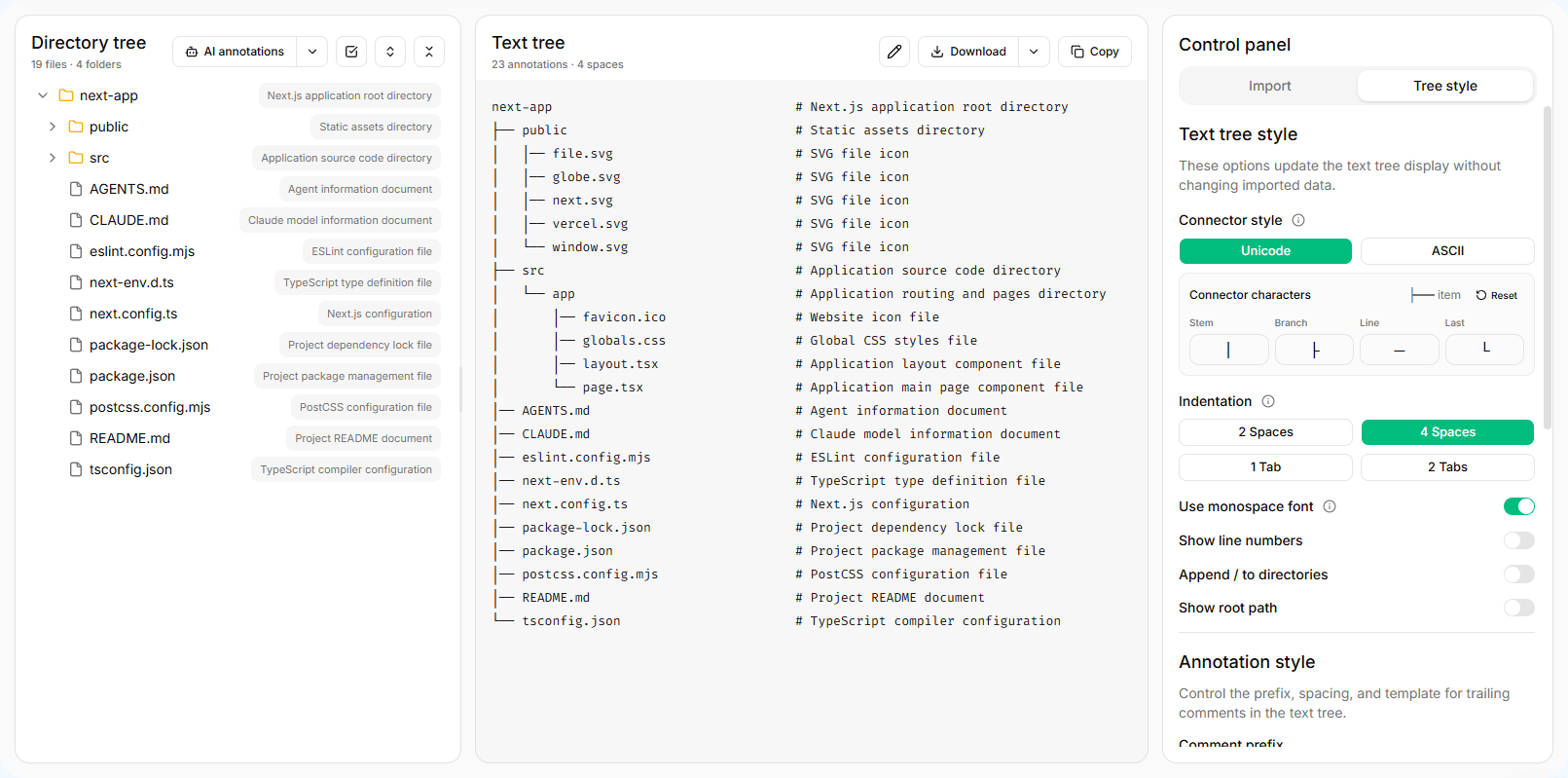
- Many sources — read local directories, ZIP archives, GitHub/GitLab repositories, imported text, or in-memory trees through a shared adapter interface
- Configurable ASCII rendering — connector styles, indentation, line numbers, full paths, and file size / modified-time metadata
- Pure tree editing — create, rename, move, delete, focus, visibility, and expansion helpers that return new trees instead of mutating your state
- Import and export — parse JSON, XML, HTML, Markdown, or ASCII tree text, and export back to JSON or ASCII
- Annotations — provider-agnostic request, diff, and patch helpers for per-node comments; bring your own AI or manual workflow
- Isomorphic and modular — tree-shakeable subpath exports, ships ESM, CommonJS, and type declarations, runs in Node.js and the browser
This checkout documents the unreleased 2.0 API; package metadata still identifies 1.0.5. Do not assume the published npm package includes these changes. Read the migration guide before upgrading.
npm install @devmc12/dir-treeRequirements:
- Node.js
>=18.18.1for the installed package. Use Node.js 22 for repository development and tests - TypeScript users can import types directly from the package
- The core and most adapters are isomorphic. Node.js filesystem reading is exposed from
@devmc12/dir-tree/node, and browser-only APIs are exposed from@devmc12/dir-tree/browser
Constructor options are defaults; read(options) overrides only that call. Temporary settings do not persist, and exclude: [] explicitly clears default exclusions. Nodes contain structure and metadata only; keep the adapter for refreshes instead of recovering source handles from the displayed tree.
Call adapter.read() directly for a fixed source. FileSystemReader is an optional wrapper for holding or switching adapters. See the source capability table for metadata, rule reading, and refresh differences; remote repositories and in-memory trees do not read .gitignore contents.
import { FileSystemReader, InMemoryFileTreeAdapter } from '@devmc12/dir-tree';
import { renderAsciiTree } from '@devmc12/dir-tree/ascii';

const reader = new FileSystemReader(
  new InMemoryFileTreeAdapter({
    name: 'project',
    path: 'project',
    kind: 'directory',
    children: [
      {
        name: 'src',
        path: 'project/src',
        kind: 'directory',
        children: [
          {
            name: 'index.ts',
            path: 'project/src/index.ts',
            kind: 'file',
          },
        ],
      },
    ],
  })
);

const tree = await reader.read({
  depth: 3,
  exclude: ['node_modules', 'dist'],
  sort: { sortBy: 'name', order: 'asc', foldersFirst: true },
});

console.log(renderAsciiTree(tree));Built-in adapters optionally report one timing result per successful read while still returning a FileNode:
const tree = await reader.read({
  onTiming: ({ prepareMs, treeMs, totalMs }) => {
    console.log({ prepareMs, treeMs, totalMs });
  },
});
Durations are wall-clock milliseconds with fractional precision. prepareMs covers native directory selection or remote repository data acquisition inside the adapter. treeMs covers tree processing, including traversal, required I/O, filtering, sorting, and indexing. totalMs is their combined duration, measured after option validation and before the callback.
Already supplied handles, files, ZIPs, paths, and in-memory trees have no preparation stage (prepareMs: 0). Selection or downloads performed by your application, adapter construction, and rendering are outside these measurements. Refreshes report only that read's work. No clock is read without onTiming; cancellation and source failures do not call it. Keep this callback synchronous; synchronous errors it throws are ignored without logging so the successful tree is still returned. Custom adapters can opt into this contract. See the timing reference for details.
Use InMemoryFileTreeAdapter when your application already has tree-shaped data or when you need deterministic tests.
import { FileSystemReader, InMemoryFileTreeAdapter } from '@devmc12/dir-tree';

const tree = await new FileSystemReader(
  new InMemoryFileTreeAdapter({
    name: 'docs',
    path: 'docs',
    kind: 'directory',
    children: [{ name: 'api.md', path: 'docs/api.md', kind: 'file' }],
  })
).read();Use NodeFileSystemAdapter from @devmc12/dir-tree/node to read a directory path from disk in Node.js. It honors the same depth, exclude, useGitignore, readFileMeta, and sort options, and is isolated from the browser entries so bundlers never pull node:fs into client builds.
import { FileSystemReader } from '@devmc12/dir-tree';
import { NodeFileSystemAdapter } from '@devmc12/dir-tree/node';
import { renderAsciiTree } from '@devmc12/dir-tree/ascii';

const tree = await new FileSystemReader(
  new NodeFileSystemAdapter('./my-project', {
    exclude: ['node_modules', 'dist'],
    useGitignore: true,
  })
).read({ readFileMeta: true });

console.log(renderAsciiTree(tree));Use browser helpers to detect directory picker support, then read with LocalFileSystemAdapter from a user action. The adapter retains the selected handle for refreshes.
import { FileSystemReader } from '@devmc12/dir-tree';
import {
  isNativeDirectoryPickerSupported,
  LocalFileSystemAdapter,
} from '@devmc12/dir-tree/browser';

if (!isNativeDirectoryPickerSupported()) {
  throw new Error('Directory picking is not supported');
}

const reader = new FileSystemReader(new LocalFileSystemAdapter());
const tree = await reader.read({ readFileMeta: true });Use ZipFileSystemAdapter with Blob, ArrayBuffer, or Uint8Array input.
import { FileSystemReader, ZipFileSystemAdapter } from '@devmc12/dir-tree';

const response = await fetch('/fixtures/project.zip');
const tree = await new FileSystemReader(
  new ZipFileSystemAdapter(await response.arrayBuffer(), {}, 'project')
).read({ showHidden: false });Use RemoteRepositoryFileSystemAdapter for GitHub or GitLab repository trees. Pass a token when the provider needs authenticated requests, or inject a custom API client for tests and self-hosted integrations.
import {
  FileSystemReader,
  RemoteRepositoryFileSystemAdapter,
} from '@devmc12/dir-tree';

const tree = await new FileSystemReader(
  new RemoteRepositoryFileSystemAdapter({
    repositoryUrl: 'https://github.com/example/project/tree/main/src',
    token: 'github-token',
  })
).read({ depth: 4 });
The built-in fetch client follows every GitHub/GitLab branch page and every GitLab repository-tree page. GitHub tree reads keep the single recursive request fast path; when GitHub marks that response as truncated, the client discards the partial data and expands the repository through complete subtrees instead. Large imports can consume significant API quota, so prefer a token or a narrower tree URL when available.
Remote repository helper functions are exported from @devmc12/dir-tree/adapters, including URL parsing, ref/path resolution, branch resolution, provider entry mapping, and fetch client creation.
Parse imported JSON, XML, HTML, Markdown list, Markdown document, or ASCII tree text into a FileNode tree, then render it back to ASCII.
import { parseImportedTreeText } from '@devmc12/dir-tree/parser';
import {
  createAsciiTreeOptionsFromConfig,
  renderAsciiTree,
} from '@devmc12/dir-tree/ascii';

const parsed = parseImportedTreeText(
  `project
  ├── src
  └── README.md`,
  'project'
);

const ascii = renderAsciiTree(
  parsed.tree,
  createAsciiTreeOptionsFromConfig({
    connectorStyle: 'unicode',
    showLineNumbers: true,
  })
);Tree operations are pure. They return cloned trees or structured edit results without mutating host UI state.
import { createFileTreeNode, renameFileTreeNode } from '@devmc12/dir-tree/tree';

const created = createFileTreeNode(tree, 'project/src', {
  kind: 'file',
  name: 'new-file.ts',
});

const renamed = created
  ? renameFileTreeNode(created.tree, created.path, 'main.ts')
: null;Use transfer helpers when you need a serializable tree file with optional annotations and visibility state.
import {
  createExportedFileTreeJson,
  parseImportedFileTreeJson,
} from '@devmc12/dir-tree/transfer';

const json = createExportedFileTreeJson(tree, annotations, { visibility });
const restored = parseImportedFileTreeJson(json);The package does not call any AI service. It only defines provider payloads, provider results, patch normalization, and diff utilities. Your application owns model calls, tokens, quotas, storage, analytics, and notifications.
import {
  applyTreeAnnotationPatches,
  createAnnotationDiffResult,
  createAnnotationProviderRequest,
  createTreeAnnotationPatchesFromProviderResult,
  type AnnotationProvider,
  type TreeAnnotationMap,
} from '@devmc12/dir-tree/annotations';

const provider: AnnotationProvider = {
  async annotate(payload) {
    return {
      annotations: payload.nodes.map(node => ({
        path: node.path,
        comment: `Describe ${node.kind}`,
      })),
    };
  },
};

const annotations: TreeAnnotationMap = {};
const request = createAnnotationProviderRequest({ tree, annotations });
const result = await provider.annotate(request.payload);
const patches = createTreeAnnotationPatchesFromProviderResult(
  result,
  request.sourcePaths
);
const diff = createAnnotationDiffResult(
  annotations,
  patches,
  request.allowedPaths
);
const nextAnnotations = applyTreeAnnotationPatches(
  annotations,
  diff.applyPatches
);
When a source is read again, keep only annotations that still match paths in the new tree, or reset them entirely.
import { resolveTreeAnnotationsAfterRead } from '@devmc12/dir-tree/annotations';

const retainedAnnotations = resolveTreeAnnotationsAfterRead(
  nextTree,
  annotations,
  'matching-paths'
);dir-tree/src
├── adapters # In-memory, Node.js, ZIP, and remote repository adapters
│ └── remoteRepository # GitHub/GitLab repository tree fetching and mapping
├── annotations # Annotation provider, patch, diff, options, and annotated ASCII
├── ascii # ASCII tree rendering, options, and monospace utilities
├── browser # Browser directory adapters, pickers, and dropped-source helpers
├── node # Node.js-only entry exposing the filesystem adapter
├── parser # Imported tree text parsers (JSON, XML, HTML, Markdown, ASCII)
├── reader # FileSystemReader, read options, metadata, and reader utilities
├── selection # Pure cascading tree selection model
├── transfer # JSON tree import/export helpers
└── tree # Pure tree editing, visibility, expansion, path, and stats utilities
Public entry points are listed in package.json#exports. Common reader APIs are available from the package root.
The two playgrounds use the 2.0 API. Development uses source aliases; migration verification also checks temporary consumers installed from the packed library without those aliases. Native picker permissions and desktop directory dragging still require manual browser checks.
The GitHub repository includes playground/, a small Vite React example that demonstrates the public @devmc12/dir-tree imports through local Vite and TypeScript aliases. It is a minimal reference, not a full app. For the complete application, see dir-tree.com.
npm run dev:playground
npm run build:playground
For a Node.js example (no browser), see playground-node/, which demonstrates NodeFileSystemAdapter, parsing, annotations, tree editing, and JSON transfer:
npm run start:playground-node- Architecture and data flow
- API reference
- Migrating from 1.x to 2.0
- Adapters
- Annotations
- Playground
- Release checklist
npm run lint
npm run typecheck
npm run test
npm run build
npm run smoke:exports
npm run smoke:install
npm run pack:verify
npm run smoke:install packs the local package, installs the tarball into a temporary consumer project, and verifies ESM, CommonJS, and TypeScript consumer imports.
Run the browser playground typecheck/build and Node example checks separately, including npm --prefix playground-node run test:migration; see the Playground guide.