

A terminal dashboard showing the CI status of your open GitHub pull requests, refreshed automatically.
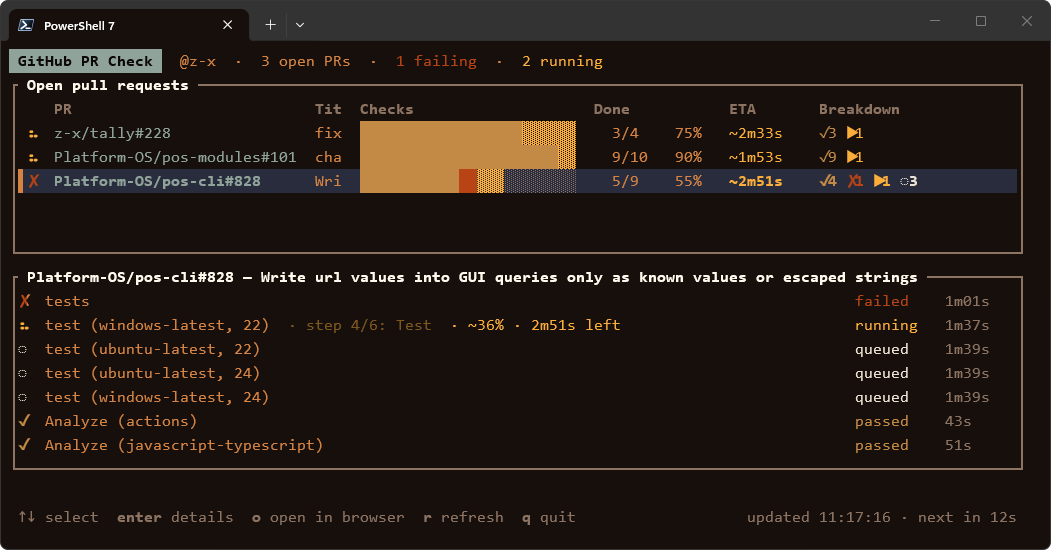
For every open PR you authored, in any repo or organization your token can see, it shows:
- the overall CI state (✓ passed, ✗ failing, spinner while running, – no checks)
- a progress bar split into passed / failed / skipped / running / queued
- how many checks have finished, out of how many, and the percentage
- for running GitHub Actions jobs: the current step, plus an estimated % and time left, based on how long the same job took in recent successful runs
- a details pane listing every check of the selected PR, failures first, with durations
PRs in archived repositories are hidden.
A classic token works with every repo you have access to, including organization repos.
- Go to https://github.com/settings/tokens/new. (That's Settings → Developer settings → Personal access tokens → Tokens (classic) → Generate new token (classic).)
- Note: e.g.
github-pr-check. - Expiration: pick one (e.g. 90 days).
- Scopes: tick
repo. Nothing else is needed. If you only work on public repos,public_repois enough. - Click Generate token and copy it (
ghp_…). GitHub shows it only once. - Organizations with SAML single sign-on: on the token list, click Configure SSO next to the token and Authorize each organization. Otherwise PRs from that org won't appear, and github-pr-check shows a warning in the footer.
Some organizations block classic tokens altogether (org setting "Restrict access via personal access tokens (classic)"). If an org's PRs still don't show up, ask an org admin.
Fine-grained tokens work too, with two limitations:
- A fine-grained token is tied to one owner: your personal account or one organization. PRs elsewhere won't show up.
- Fine-grained tokens can't be granted the "Checks" permission (GitHub reserves it for GitHub Apps). The counts and progress bar stay accurate. github-pr-check gets check names and step progress from the GitHub Actions API instead, so checks from third-party apps (non-Actions check runs) appear in the counts but not by name.
Create one at https://github.com/settings/personal-access-tokens/new with these repository permissions:
| Permission | Access |
|---|---|
| Pull requests | Read-only |
| Commit statuses | Read-only |
| Actions | Read-only |
| Metadata | Read-only (added automatically) |
github-pr-check checks these variables, in order: GITHUB_PAT, GITHUB_TOKEN, GH_TOKEN.
Option A: a .env file, either next to the github-pr-check binary or in the directory you run it from:
GITHUB_PAT=ghp_yourTokenHere
If both exist, the one in the current directory wins. Real environment variables take precedence over any .env. If no token is found, the error message lists every path that was checked. .env is in .gitignore, so it won't be committed.
Option B: an environment variable. This is better if you install github-pr-check globally and run it from anywhere.
PowerShell, for the current session:
$env:GITHUB_PAT = "ghp_yourTokenHere"Windows, permanently for your user (open a new terminal afterwards):
setx GITHUB_PAT "ghp_yourTokenHere"macOS / Linux (add it to ~/.bashrc, ~/.zshrc, …):
export GITHUB_PAT=ghp_yourTokenHeremacOS / Linux (Homebrew):
brew install z-x/tap/github-pr-checkHomebrew installs the same prebuilt binary as the Releases page, without the macOS "Apple could not verify…" prompt described below.
macOS / Linux (mise): installs the binary straight from this repository's Releases:
mise use -g github:z-x/github-pr-checkWith Rust installed (crates.io):
cargo install github-pr-check     # builds from source
cargo binstall github-pr-check    # downloads the prebuilt binary instead
With a package manager, use option B (an environment variable) for the token. The install location changes between versions, so a .env next to the executable would get lost on upgrade.
Grab the archive for your platform from the repository's Releases page:
| Platform | File |
|---|---|
| Windows (x64) | github-pr-check-<version>-x86_64-pc-windows-msvc.zip |
| Linux (x64) | github-pr-check-<version>-x86_64-unknown-linux-musl.tar.gz |
| Linux (ARM64) | github-pr-check-<version>-aarch64-unknown-linux-musl.tar.gz |
| macOS (Apple Silicon) | github-pr-check-<version>-aarch64-apple-darwin.tar.gz |
| macOS (Intel) | github-pr-check-<version>-x86_64-apple-darwin.tar.gz |
Unpack it and put github-pr-check (github-pr-check.exe on Windows) somewhere on your PATH. The Linux binaries are fully static and work on any distribution. SHA256SUMS.txt lists checksums for verifying the downloads.
- Linux / macOS: if needed, make it executable with
chmod +x github-pr-check.
This only applies to an archive downloaded in a browser. Installs through Homebrew, mise or cargo aren't affected.
The binary isn't signed or notarized by Apple, so macOS blocks its first launch. How to allow it.
The first launch shows a message like "github-pr-check" Not Opened or Apple could not verify "github-pr-check" is free of malware. Click Done (not Move to Trash), then allow it once:
- Open System Settings → Privacy & Security.
- Scroll down to the Security section. It shows "github-pr-check" was blocked to protect your Mac.
- Click Open Anyway and confirm with your password or Touch ID.
- Run the app again and click Open Anyway in the dialog that follows.
After that, macOS remembers the choice for this copy. Repeat these steps after downloading a new version.
The Open Anyway button only appears for about an hour after the blocked launch. If it isn't there, run the app again first.
Alternative (Terminal): remove the quarantine flag that macOS adds to downloaded files, and the app runs without any prompt:
xattr -d com.apple.quarantine ./github-pr-checkYou need Rust (stable). Install it from https://rustup.rs.
- Windows: you also need the Visual Studio C++ Build Tools (the "Desktop development with C++" workload). rustup offers to install them, or run:
winget install Microsoft.VisualStudio.2022.BuildTools --override "--passive --wait --add Microsoft.VisualStudio.Workload.VCTools --includeRecommended"
- Linux / macOS: a C compiler (
build-essential/ Xcode Command Line Tools). OpenSSL isn't needed: TLS is built in.
Run it from the project directory:
cargo run --releaseOr install it as a command you can run from anywhere. cargo install puts the binary in ~/.cargo/bin, so either put .env there or use option B:
cargo install --path .
github-pr-check| Option | Description |
|---|---|
-i, --interval <secs> |
Auto-refresh interval in seconds (default 15, minimum 5) |
--once |
Print a plain-text snapshot and exit, without the interactive view. Useful for scripts or for checking a token. |
-V, --version |
Show version |
-h, --help |
Show help |
cargo run --release -- --interval 30
cargo run --release -- --once| Key | Action |
|---|---|
↑ ↓ / k j |
Select PR |
Home End / g G |
First / last PR |
Enter / d |
Toggle the details pane |
o |
Open the selected PR in the browser |
r |
Refresh now |
q / Esc / Ctrl+C |
Quit |
.github/workflows/release.yml builds every platform on GitHub Actions. To publish a release:
- Bump
versioninCargo.tomland commit. - Tag and push:
git tag v0.2.0
git push origin v0.2.0
The workflow builds all five targets and creates a GitHub Release with the archives and SHA256SUMS.txt. To build without publishing, run the workflow manually from the Actions tab; the binaries then appear as artifacts of that run.
Once set up, every release tag (except pre-releases like v0.2.0-rc1) also opens a pull request on microsoft/winget-pkgs updating the z-x.GitHubPRCheck package. A winget moderator merges it, usually within a few days.
One-time setup:
- Fork https://github.com/microsoft/winget-pkgs to your account. The workflow pushes its branches there.
- Submit the first version by hand, since the automation can only update an existing package. Take the Windows zip URL of a release made by this workflow:
Use
winget install wingetcreate
wingetcreate new https://github.com/z-x/github-pr-check/releases/download/v0.2.0/github-pr-check-v0.2.0-x86_64-pc-windows-msvc.zip
z-x.GitHubPRCheckas the package identifier, andgithub-pr-checkas the portable command alias. When it asks, let it submit the PR. Wait for it to be merged. - Create a classic token with the
public_reposcope (https://github.com/settings/tokens/new) and add it as a repository secret namedWINGET_TOKEN(Settings → Secrets and variables → Actions).
Until the secret exists, the Submit to winget job is skipped.
Every release tag (except pre-releases) rewrites Formula/github-pr-check.rb in z-x/homebrew-tap using .github/scripts/homebrew-formula.sh, pointing at the new archives and checksums. Users get it with brew upgrade.
One-time setup: create a fine-grained token (https://github.com/settings/personal-access-tokens/new) with access to only the z-x/homebrew-tap repository and the Contents: Read and write permission. Add it as a repository secret named HOMEBREW_TAP_TOKEN. Until the secret exists, the Update Homebrew tap job is skipped.
Every release tag (except pre-releases) runs cargo publish, after checking that the Cargo.toml version matches the tag. It uses crates.io trusted publishing, so no token is stored.
One-time setup, after the first version was published by hand with cargo publish: on https://crates.io/crates/github-pr-check/settings, add a trusted publisher with owner z-x, repository github-pr-check and workflow release.yml.
For each running GitHub Actions job, github-pr-check looks up the last 5 successful runs of the same workflow and takes the median duration of the job with the same name. Elapsed time against that median gives the ~62% · 1m10s left shown in the details pane. The ETA column shows when the slowest running job of the PR should finish.
- These are time-based estimates, not real test counts.
- Jobs that are still queued aren't included in the ETA.
- A job with no successful runs yet shows no estimate.
- A job that runs past its usual duration shows
… longer than usual(overduein the ETA column). - Job history is cached for 30 minutes, and finished runs are never fetched again, so the extra API usage is small.
| Symptom | Fix |
|---|---|
401 Unauthorized |
The token is wrong or expired. Generate a new one. |
| An organization's PRs are missing | Authorize the token for SSO (step 1.6). The org may also restrict classic tokens. With a fine-grained token, only one owner's repos are visible. |
| ⚠ warning in the footer | Non-fatal problems such as SSO or permissions. The rest of the data is still shown. |
| Check names missing, counts fine | Fine-grained token without Actions: Read-only, or the checks come from a third-party app. Use a classic token. |
failed to remove file … github-pr-check.exe (Access is denied) while rebuilding on Windows |
github-pr-check is still running. Quit it (q) and rebuild. |
| Odd symbols instead of ✓ ✗ ⠹ █ | Use a terminal font with good Unicode coverage (e.g. Cascadia Code, JetBrains Mono). |
| Dim text hard to read | github-pr-check uses your terminal's bright black colour for secondary text. Make it lighter in your terminal's colour scheme. |
GitHub's API rate limits are not a concern at the default interval: one GraphQL request per refresh, plus a few REST calls only while CI is running.
MIT. See LICENSE.